
AI Assistant for Employees is an enterprise AI deployment model designed to create an intelligent digital assistant that supports employees in their daily work. Instead of replacing humans, AI Assistants act as a “digital coworker” that helps employees process information faster, automate repetitive tasks, and improve overall productivity.
This model has become one of the most popular AI applications in enterprise digital transformation, especially across departments such as marketing, sales, human resources, finance, customer service, and business operations.
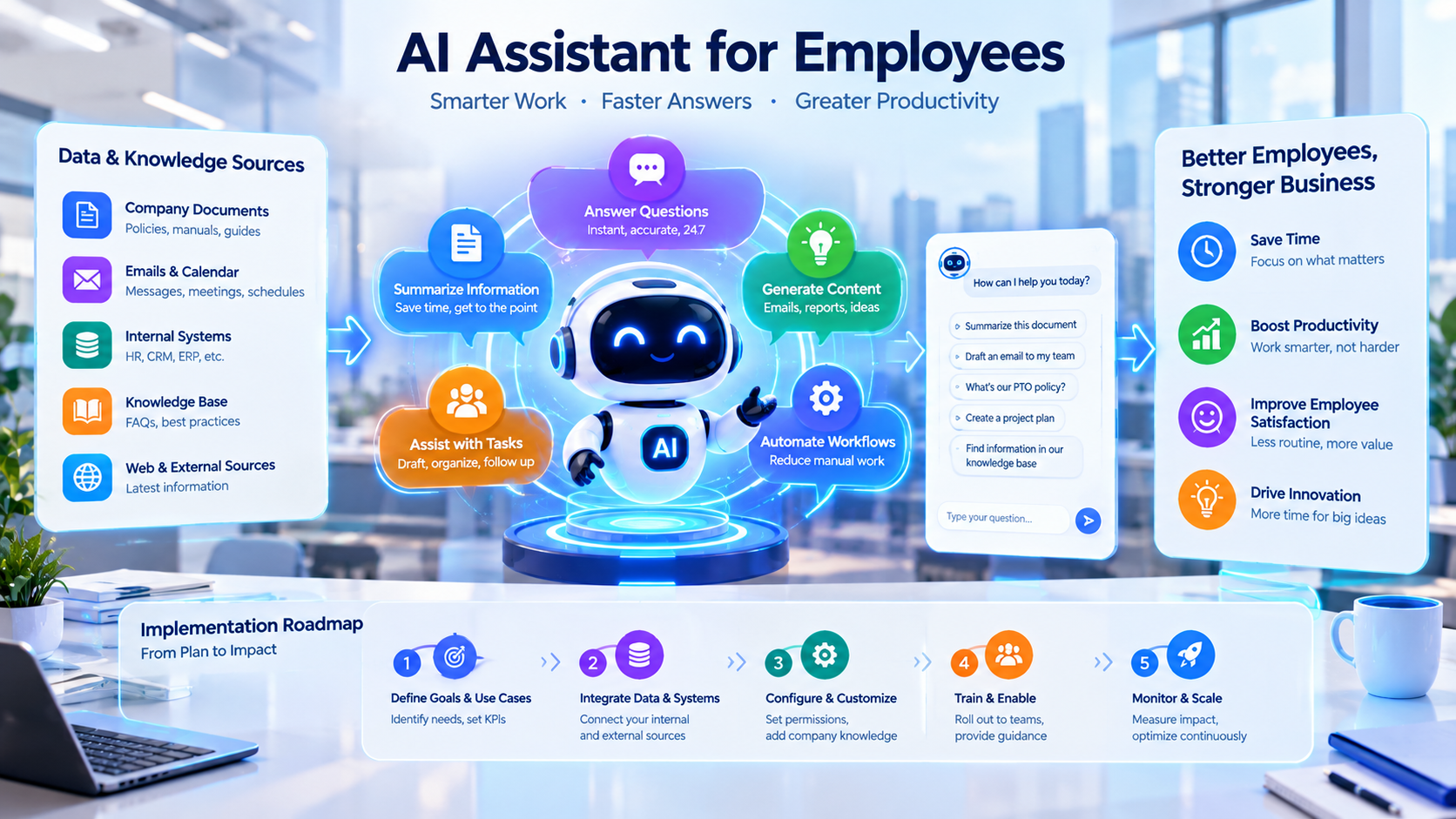
Objectives of AI Assistant Deployment
Organizations implement AI Assistants to:
- Increase employee productivity.
- Reduce time spent on manual tasks.
- Improve access to internal knowledge.
- Automate routine office workflows.
- Accelerate decision-making.
- Allow employees to focus on higher-value activities.
Example:
A marketing employee can use AI to create a content strategy within minutes instead of spending several hours researching and writing manually.
AI Assistant Deployment Architecture
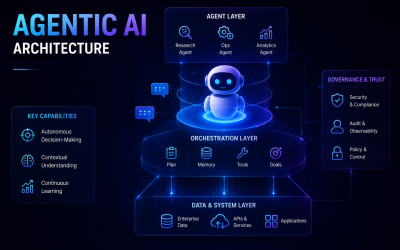
A typical AI Assistant for Employees system consists of five core layers:
1. User Interface Layer
This is where employees interact with the AI Assistant:
- Internal chat platforms.
- Microsoft Teams.
- Slack.
- Enterprise applications.
- Employee portals.
Employees can ask questions using natural language instead of manually searching through multiple systems.
2. AI Engine Layer
This is the intelligence layer powered by:
- Large Language Models (LLMs).
- Natural Language Processing (NLP).
- Machine Learning.
- Generative AI.
AI can:
- Understand employee requests.
- Generate business content.
- Summarize documents.
- Analyze data.
- Provide recommendations.
3. Knowledge Base Layer
The AI Assistant connects with enterprise knowledge sources, including:
- Operational procedures.
- Training materials.
- Company policies.
- Business documents.
- Product information.
- Internal reports.
- Frequently Asked Questions (FAQs).
This enables AI to provide answers based on company-specific knowledge rather than only general information.

4. Business Integration Layer
AI Assistants can integrate with existing enterprise systems:
- CRM platforms.
- ERP systems.
- HR management systems.
- Email platforms.
- Google Workspace.
- Microsoft 365.
- Project management tools.
Example:
A sales employee can ask:
“What is the current status of customer A?”
The AI Assistant can retrieve CRM data and instantly generate a customer summary.
5. Security & Governance Layer
Enterprise AI deployment requires strong security controls:
- User permission management.
- Internal data protection.
- Usage monitoring.
- Sensitive information management.
- Compliance with security regulations.
Practical Applications Across Departments
1. AI Assistant for Marketing
AI supports marketing teams with:
- Blog writing.
- Advertising content creation.
- Market research.
- Competitor analysis.
- SEO planning.
- Email marketing campaigns.
Popular AI tools:
ChatGPT, Gemini, Claude, Jasper AI, Canva AI.
2. AI Assistant for Sales
AI helps sales teams:
- Prepare proposals.
- Write customer follow-up emails.
- Analyze customer needs.
- Create sales presentations.
- Summarize meetings.
- Improve sales strategies.
3. AI Assistant for Human Resources (HR)
AI improves HR operations through:
- Job description creation.
- Candidate screening support.
- Training material development.
- Employee policy assistance.
- New employee onboarding.
4. AI Assistant for Finance
AI supports financial teams with:
- Financial report analysis.
- Data summarization.
- Budget planning.
- Revenue forecasting.
- Financial performance insights.
5. AI Assistant for IT
AI helps IT teams with:
- Code generation.
- Software troubleshooting.
- Technical documentation.
- System analysis.
- IT workflow automation.
AI Assistant Implementation Roadmap
Step 1: Identify Business Needs
Organizations should analyze:
- Which tasks consume the most time?
- Which processes can be automated?
- Which departments can benefit most from AI support?
Step 2: Launch a Pilot Program
Start with a small group or department:
- Marketing.
- Sales.
- HR.
- Customer Service.
Measure results before expanding across the organization.
Step 3: Connect Enterprise Data
Integrate AI with:
- Internal documents.
- Knowledge repositories.
- Business applications.
- Enterprise databases.
This allows AI to deliver more accurate and context-aware responses.
Step 4: Train Employees
Employees should learn:
- How to write effective prompts.
- How to evaluate AI-generated results.
- How to use AI securely.
- How to integrate AI into daily workflows.
Step 5: Measure and Scale
Organizations should track:
- Time saved.
- User adoption.
- Productivity improvements.
- Employee satisfaction.
- Business impact.
Successful implementations can then be expanded across the entire organization.
Key Benefits of AI Assistant
Increased Productivity
- Reduces time spent on administrative and repetitive tasks.
- Helps employees complete work faster.
Cost Optimization
- Automates routine processes.
- Reduces operational workload.
Faster Access to Information
- Employees can find internal knowledge within seconds.
- Reduces time spent searching through documents.
Improved Work Quality
- AI assists with writing, analysis, and error detection.
- Creates more consistent business outputs.
Encourages Innovation
- Employees have more time for creative thinking and strategic activities.
Conclusion
AI Assistant for Employees is becoming a critical foundation of enterprise AI transformation. This model does not simply provide automation; it creates a smarter workplace where humans and AI collaborate to improve efficiency, creativity, and decision-making.
In the future, AI Assistants will evolve from simple productivity tools into intelligent digital partners that help every employee work smarter, make better decisions, and create greater business value.
Write Your Review
No reviews yet. Be the first to share your experience!