
Every successful business depends on efficient workflows. Whether you're launching a marketing campaign, managing customer relationships, onboarding new employees, or developing software, having a structured process helps teams stay organized, collaborate effectively, and deliver consistent results.
However, creating workflows from scratch can be time-consuming. Teams often spend days designing boards, defining task stages, creating automation rules, and deciding which information should be tracked. This slows implementation and increases the likelihood of inconsistent processes across departments.
This is where monday.com Templates provide significant value.
Instead of building workflows manually, monday.com offers hundreds of professionally designed templates that organizations can customize to match their specific needs. These templates help businesses get started quickly while following proven project management best practices.
Whether you're a freelancer, startup, growing business, or enterprise organization, templates reduce setup time, improve consistency, and accelerate productivity.
In this guide, we'll explore how monday.com templates work, their key benefits, the best templates for different business functions, and practical tips for building efficient workflows.
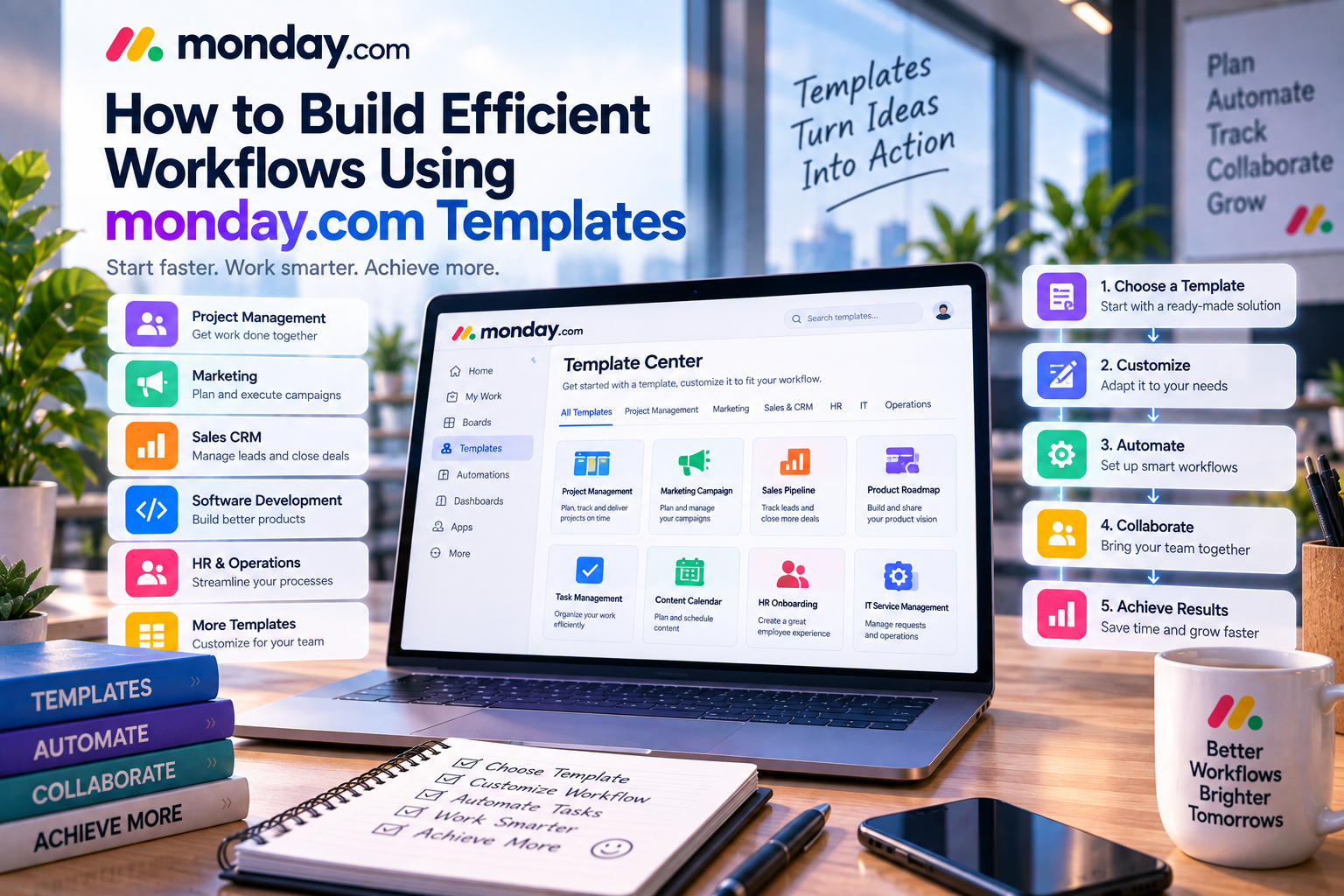
What Are monday.com Templates?
A monday.com template is a pre-built workspace that includes the structure, columns, statuses, views, and often automation needed for a specific workflow.
Instead of starting with a blank board, users can select a template that closely matches their business process and customize it as needed.
Templates typically include:
- Task structure
- Status columns
- People assignments
- Due dates
- Priority levels
- Dashboards
- Views
- Basic automation
- Reporting widgets
This dramatically reduces the amount of work required during implementation.
Why Templates Matter
Many organizations delay adopting project management software because they believe implementation will require weeks of planning.
Templates eliminate much of that complexity.
Rather than asking:
“How should we build this workflow?”
Teams can begin with a proven framework and focus on customizing it for their own business.
The result is:
- Faster deployment
- Better consistency
- Reduced onboarding time
- Higher user adoption
For organizations introducing work management software to employees for the first time, templates significantly reduce the learning curve.
Key Benefits of monday.com Templates
1. Faster Project Setup
Building a workflow manually requires planning every detail.
Templates remove most of this work.
For example, a marketing team launching a new campaign can select a Marketing Campaign Template that already includes:
- Campaign planning
- Content production
- Design review
- Publishing
- Performance tracking
Instead of spending hours configuring boards, the team can begin working almost immediately.
2. Standardized Business Processes
Consistency is essential for growing organizations.
Without standardized workflows, different teams often manage projects differently, making reporting and collaboration difficult.
Templates establish common processes across departments.
This helps ensure:
- Everyone follows the same workflow
- Project reporting remains consistent
- New employees learn faster
- Management gains better visibility
Standardization also improves scalability as businesses expand.
3. Easier Employee Onboarding
New employees often struggle to understand internal workflows.
Templates provide clear structures that make responsibilities easier to understand.
Rather than learning undocumented processes, new team members can immediately see:
- Task stages
- Deadlines
- Responsibilities
- Approval processes
This accelerates onboarding while reducing training requirements.
4. Built-in Best Practices
Many monday.com templates are based on widely accepted project management methodologies.
Instead of designing workflows through trial and error, businesses benefit from structures that have already proven effective across different industries.
These best practices improve project organization and reduce operational mistakes.
Popular monday.com Templates
Marketing Campaign Template
Marketing teams manage multiple activities simultaneously.
This template typically includes:
- Campaign planning
- Content calendar
- Design requests
- Advertising schedule
- Social media management
- Performance reporting
Ideal for:
- Marketing agencies
- Content teams
- Digital marketers
CRM Sales Pipeline Template
Sales teams need visibility into customer relationships.
This template tracks:
- Leads
- Qualified prospects
- Opportunities
- Closed deals
- Follow-up activities
Benefits include:
- Better pipeline management
- Improved forecasting
- Stronger customer relationships
Product Roadmap Template
Product teams use roadmaps to coordinate feature development.
Typical stages include:
- Ideas
- Planning
- Development
- Testing
- Release
This template helps align engineering, product, and business stakeholders.
Employee Onboarding Template
Human Resources departments often repeat the same onboarding process.
This template includes:
- Document collection
- Equipment requests
- Training schedule
- Orientation checklist
- Performance reviews
Automation ensures every new employee receives a consistent onboarding experience.
Event Planning Template
Event organizers coordinate many moving parts.
The template helps manage:
- Budget
- Vendors
- Venue
- Timeline
- Guest lists
- Marketing activities
This reduces planning complexity while improving coordination.
Building an Efficient Workflow with Templates
Using a template is only the beginning.
To maximize productivity, businesses should customize workflows according to their own processes.
Step 1: Define Your Objective
Before selecting a template, identify the business goal.
Examples include:
- Launch a product
- Manage customer relationships
- Publish content
- Recruit employees
- Track software development
The clearer the objective, the easier it is to choose the right template.
Step 2: Customize the Board
Every organization works differently.
Modify the template by adding:
- Custom columns
- Labels
- Status options
- Priority levels
- Budget tracking
- Department-specific information
Avoid unnecessary complexity.
Only include information that supports your workflow.
Step 3: Add Automation
Templates become much more powerful when combined with automation.
Examples include:
- Notify managers when projects are completed.
- Automatically assign new tasks.
- Send deadline reminders.
- Create recurring tasks.
- Update statuses automatically.
Automation reduces repetitive work while keeping projects moving.
Step 4: Create Dashboards
Dashboards provide managers with a real-time overview of project performance.
Useful dashboard widgets include:
- Progress tracking
- Workload reports
- Budget monitoring
- Timeline visualization
- KPI metrics
This allows leadership to monitor workflow health without requesting manual updates.
Step 5: Integrate External Tools
Most businesses already use multiple software applications.
Integrating templates with tools like:
- Slack
- Microsoft Teams
- Google Workspace
- Outlook
- Salesforce
- HubSpot
- Zoom
creates a connected digital workplace.
Information flows automatically between systems, reducing duplicate work.
Real-World Workflow Examples
Marketing Agency
A digital agency uses the Content Calendar Template.
Workflow:
Client Brief → Content Creation → SEO Review → Design → Approval → Publishing → Reporting
Automation sends notifications whenever a task moves to the next stage.
Software Development Team
Using the Product Roadmap Template:
Feature Request → Planning → Development → QA Testing → Release
Dashboards monitor sprint progress while automation updates stakeholders.
Human Resources
An HR department uses the Employee Onboarding Template.
Automation ensures that:
- IT prepares equipment.
- Managers receive onboarding reminders.
- Training sessions are scheduled.
- HR tracks completion.
The entire onboarding process becomes standardized and measurable.
Best Practices for Using Templates
Keep Workflows Simple
Avoid adding unnecessary columns or statuses.
Simple workflows encourage adoption.
Customize Gradually
Start with the template.
Improve it over time based on team feedback.
Train Your Team
Explain:
- Workflow stages
- Responsibilities
- Automation rules
- Dashboard usage
Proper training increases adoption and reduces confusion.
Review Regularly
Business processes evolve.
Review templates every few months to ensure they still support organizational goals.
Advantages of monday.com Templates
✔ Rapid implementation
✔ Reduced setup time
✔ Standardized workflows
✔ Easier onboarding
✔ Built-in project management best practices
✔ Highly customizable
✔ Works with automation and dashboards
✔ Suitable for businesses of every size
Potential Limitations
While templates provide an excellent starting point, they are not a complete solution.
Businesses should consider:
- Some templates require customization before they match company processes.
- Large organizations may need multiple interconnected templates.
- Advanced workflows often benefit from additional automation and dashboards.
- Using too many templates without governance can create duplicate processes.
A thoughtful implementation strategy ensures templates remain valuable as the organization grows.
Final Verdict
monday.com Templates are one of the platform's most practical productivity features.
Rather than forcing businesses to build workflows from scratch, templates provide professionally designed starting points that reduce implementation time while promoting consistency across teams.
Whether you're managing projects, marketing campaigns, customer relationships, HR operations, or software development, templates help teams become productive faster and establish repeatable processes that scale with business growth.
Combined with monday.com's automation, dashboards, AI capabilities, and integrations, templates form the foundation of an efficient digital workplace.
For businesses seeking to improve collaboration, reduce administrative effort, and accelerate project delivery, monday.com Templates are an invaluable resource.

Write Your Review
No reviews yet. Be the first to share your experience!