
Every business wants to improve productivity, but hiring more employees isn't always the answer. In many organizations, the biggest productivity killer isn't a lack of talent—it's repetitive manual work.
Employees spend countless hours every week updating spreadsheets, assigning tasks, sending reminders, following up on approvals, and copying information between different software platforms. These repetitive activities not only consume valuable time but also increase the risk of human error and slow down business operations.
According to industry research, knowledge workers spend a significant portion of their workweek on routine administrative tasks rather than high-value activities. As organizations grow, these inefficiencies become even more noticeable.
This is where workflow automation makes a difference.
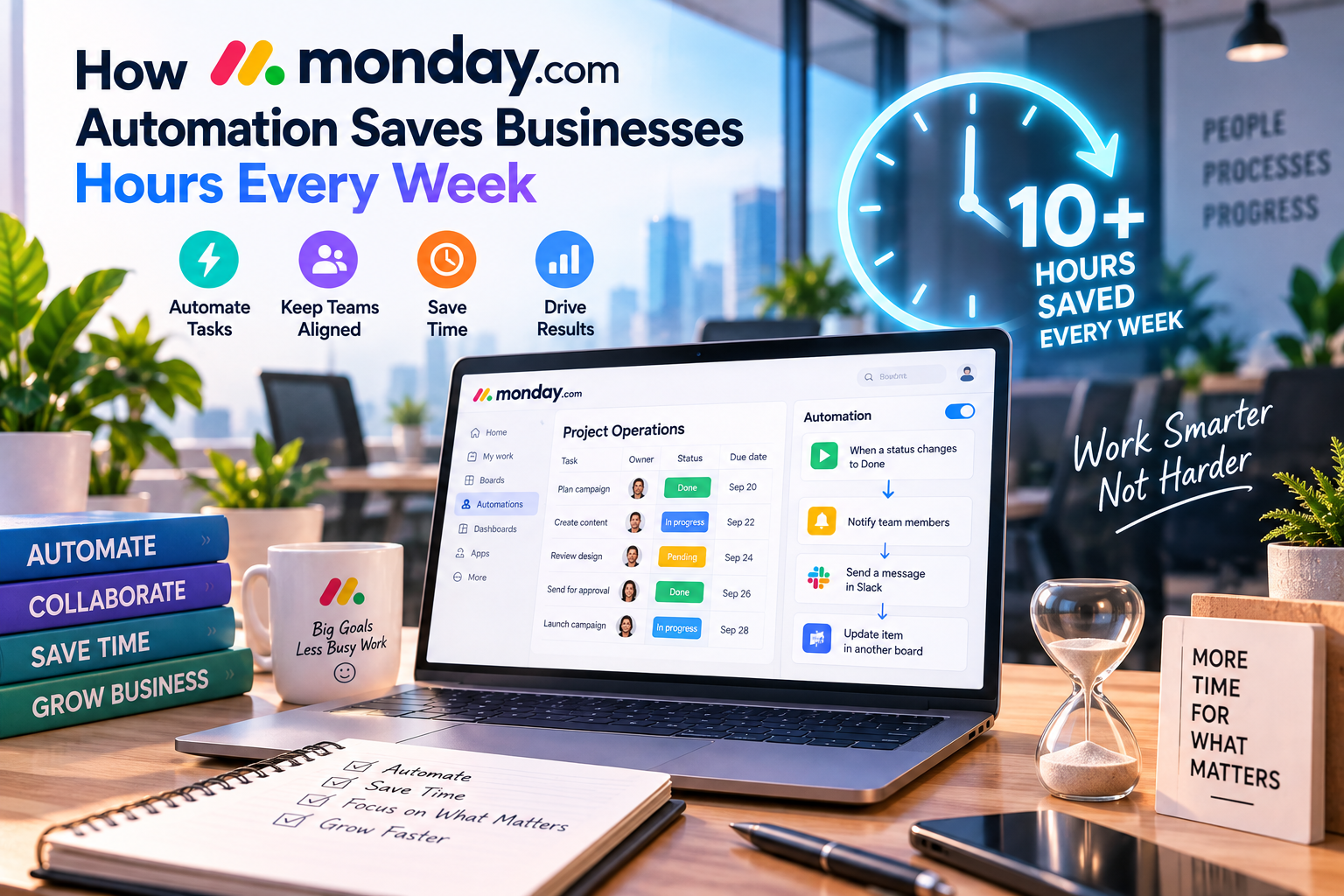
monday.com Automation allows businesses to automate repetitive processes without writing a single line of code. Using simple automation recipes, teams can create workflows that automatically assign tasks, update statuses, notify colleagues, create new items, and synchronize information across multiple tools.
In this article, we'll explore how monday.com automation works, its key capabilities, real-world use cases, and why it has become one of the platform's most valuable productivity features.
What Is monday.com Automation?
Automation in monday.com is a no-code feature that enables users to automate repetitive tasks based on predefined conditions.
Instead of manually performing the same actions every day, users simply create an automation rule that tells the system what should happen when a specific event occurs.
A typical automation follows this simple logic:
When this happens → Automatically do this
For example:
- When a task is completed → Notify the project manager.
- When a due date arrives → Send a reminder to the assigned employee.
- When a sales deal is won → Create an onboarding project automatically.
- When a support ticket is closed → Update the customer status.
The goal is simple: eliminate repetitive work so employees can focus on more valuable responsibilities.
Why Automation Matters in Modern Businesses
Today's businesses move faster than ever before.
Marketing campaigns, software releases, customer support, sales operations, and internal projects all involve dozens—or even hundreds—of repetitive actions every day.
Without automation, employees must manually:
- Assign new tasks
- Update project statuses
- Send reminder emails
- Notify managers
- Create recurring work
- Move tasks between workflow stages
- Follow up with customers
While each task may only take a few minutes, together they can consume several hours every week.
Automation allows these processes to happen instantly and consistently.
How monday.com Automation Works
One of monday.com's greatest strengths is its ease of use.
Unlike traditional automation platforms that require programming knowledge, monday.com offers a visual interface where users can create automation recipes in just a few clicks.
The process generally involves three steps:
Step 1: Choose a Trigger
A trigger is the event that starts an automation.
Examples include:
- Status changes
- New task created
- Deadline reached
- Item moved
- Form submitted
- Person assigned
Step 2: Choose an Action
After the trigger occurs, monday.com performs one or more actions automatically.
Common actions include:
- Notify someone
- Assign a person
- Change a status
- Move an item
- Create a new task
- Update a date
- Send an email
Step 3: Activate the Workflow
Once the automation is saved, it runs automatically whenever the selected trigger occurs.
No manual intervention is required.
Five Ways monday.com Automation Saves Time
1. Automatic Task Assignment
Manually assigning work becomes increasingly difficult as projects grow.
Automation ensures that every new task immediately reaches the correct person.
Example:
When a new marketing request is submitted → Assign it to the Content Manager.
Benefits:
- Faster response times
- No forgotten assignments
- Clear ownership
2. Smart Deadline Reminders
Missed deadlines often happen because employees simply forget about upcoming tasks.
Instead of relying on manual follow-ups, monday.com automatically reminds team members before deadlines arrive.
Example:
One day before the due date → Notify the assigned employee and project manager.
Benefits:
- Fewer late projects
- Better accountability
- Improved project visibility
3. Automatic Status Updates
Project managers frequently spend time updating task statuses.
Automation removes this burden.
Example:
When all subtasks are completed → Change the project status to “Ready for Review.”
Benefits:
- Real-time project tracking
- More accurate reporting
- Less administrative work
4. Approval Workflows
Many businesses require approvals before work moves forward.
Automation simplifies this process.
Example:
When a designer finishes a project:
- Notify the marketing manager.
- Request approval.
- Once approved, automatically move the project to Publishing.
This creates a smooth approval process without constant manual communication.
5. Recurring Tasks
Many business activities repeat weekly or monthly.
Examples include:
- Team meetings
- Payroll preparation
- Monthly reports
- Security audits
- Marketing reviews
Automation can generate recurring tasks automatically.
This eliminates the need to recreate identical work every month.
Real-World Business Use Cases
Marketing Teams
Marketing departments often manage multiple campaigns simultaneously.
Automation can:
- Assign new blog articles to writers
- Notify editors when drafts are complete
- Move approved content to publishing
- Inform social media managers when content goes live
Result:
A smoother content production process with fewer delays.
Sales Teams
Sales representatives spend valuable time managing leads.
Automation can:
- Assign new leads
- Update deal stages
- Notify account managers
- Schedule follow-up reminders
- Trigger onboarding after a sale closes
This allows sales professionals to focus on building customer relationships rather than administrative work.
Human Resources
HR departments perform many repetitive tasks.
Examples include:
- Employee onboarding
- Interview scheduling
- Document collection
- Performance review reminders
Automation standardizes these processes and improves the employee experience.
Customer Support
Support teams can automate:
- Ticket assignment
- Priority updates
- Escalation notifications
- Customer follow-up emails
This reduces response times and improves service quality.
Integrating Automation with Other Business Tools
Automation becomes even more powerful when combined with integrations.
monday.com connects with popular business platforms such as:
- Slack
- Microsoft Teams
- Google Workspace
- Outlook
- Salesforce
- HubSpot
- Jira
- Zoom
- Zapier
For example:
A new customer signs a contract in Salesforce.
Automation immediately:
- Creates an onboarding project in monday.com.
- Assigns tasks to the implementation team.
- Notifies customer success.
- Sends a welcome email.
The entire workflow happens automatically.
Best Practices for Building Automation
While automation is powerful, effective implementation requires planning.
Start Small
Automate your most repetitive tasks first.
Avoid trying to automate everything at once.
Standardize Workflows
Automation works best when business processes are consistent.
Clearly define each workflow before creating automation rules.
Keep Rules Simple
Complex automation chains can become difficult to maintain.
Whenever possible, create clear and focused automation recipes.
Monitor Performance
Review automation regularly.
If business processes change, update workflows to ensure they remain effective.
Advantages of monday.com Automation
✔ No coding required
✔ Easy visual setup
✔ Reduces repetitive work
✔ Improves team consistency
✔ Faster project execution
✔ Better collaboration
✔ Fewer manual errors
✔ Scales with business growth
Potential Limitations
Although automation is highly valuable, businesses should also understand its limitations.
- Advanced automation capabilities are available only on higher-tier plans.
- Over-automation can make workflows harder to understand.
- Complex enterprise processes may require additional integrations or customization.
- Teams should regularly review automation rules as business needs evolve.
When implemented thoughtfully, however, these limitations are usually outweighed by the productivity gains.
Expert Tips for Maximizing Automation
To get the most value from monday.com automation:
- Identify repetitive tasks before building workflows.
- Involve team members when designing automation rules.
- Test new workflows with a small group before rolling them out company-wide.
- Combine automation with dashboards to monitor workflow performance.
- Review automation every quarter to remove outdated rules and improve efficiency.
Businesses that continuously optimize their automation strategy often experience greater productivity improvements over time.
Final Verdict
Automation is one of the most valuable capabilities within monday.com.
Rather than replacing employees, it removes repetitive administrative work that prevents teams from focusing on creativity, strategy, customer relationships, and innovation.
Whether you're managing marketing campaigns, sales pipelines, HR processes, customer support, or software development, monday.com's no-code automation can simplify daily operations while improving accuracy and collaboration.
For organizations looking to scale without dramatically increasing administrative overhead, investing time in automation is one of the smartest decisions they can make.
If your team spends hours every week performing repetitive tasks, monday.com Automation can deliver measurable productivity gains from day one.



Write Your Review
No reviews yet. Be the first to share your experience!