
Managing receipts and invoices manually in Xero can become time-consuming as your business grows. Fortunately, Dext integrates seamlessly with Xero, allowing you to automate document capture, AI-powered data extraction, and transaction publishing.
By connecting Dext with Xero, you can eliminate duplicate data entry, improve bookkeeping accuracy, and streamline your accounting workflow.
This guide explains how to connect Dext with Xero in just a few simple steps.

Why Connect Dext with Xero?
Dext and Xero work together to automate bookkeeping from document capture to financial reporting.
Benefits include:
- Automatic receipt and invoice processing
- AI-powered data extraction
- Reduced manual bookkeeping
- Faster bank reconciliation
- Digital document storage
- Improved collaboration with accountants
- More accurate financial records
For businesses using Xero every day, the integration can save hours of administrative work each month.
Step 1: Sign In to Your Dext Account
Start by logging into your Dext account.
If you're new to Dext, create your account first and complete your company profile before setting up integrations.
Step 2: Navigate to Integrations
Inside your Dext dashboard:
- Open Settings.
- Select Connections or Integrations.
- Choose Xero from the list of supported accounting platforms.
This begins the authorization process.
Step 3: Authorize Your Xero Account
You'll be redirected to the Xero login page.
Simply:
- Sign in to your Xero account.
- Select the organization you want to connect.
- Review the requested permissions.
- Click Allow Access.
Once authorized, Dext automatically establishes a secure connection with your Xero organization.
Step 4: Synchronize Accounting Data
After connecting, Dext imports important accounting information from Xero, including:
- Chart of Accounts
- Tax rates
- Tracking Categories
- Contacts and suppliers
- Payment accounts
- Currencies (where applicable)
This synchronization ensures your bookkeeping information remains consistent across both platforms.
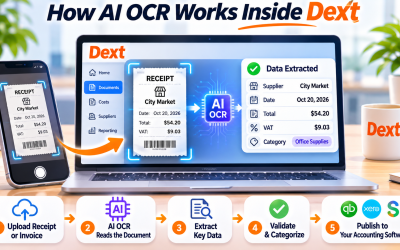
Step 5: Upload Your Financial Documents
Now you're ready to begin using Dext.
Upload documents through:
- Mobile app
- Email forwarding
- Desktop upload
- Drag-and-drop
- PDF files
Dext immediately begins processing receipts and invoices using AI and OCR technology.
Step 6: Review and Categorize Transactions
Before publishing, review the extracted information.
Verify:
- Supplier
- Invoice date
- Total amount
- Tax information
- Expense category
- Xero account code
Dext may automatically recommend accounting categories based on previous transactions, helping you work more efficiently.
Step 7: Publish to Xero
After approval, simply click Publish.
Dext transfers the verified transaction directly into Xero, including:
- Financial data
- Expense categories
- Tax details
- Supplier information
- Attached receipt or invoice image
This eliminates duplicate data entry while keeping your accounting records organized and up to date.
Best Practices for Using Dext with Xero
To maximize the benefits of the integration:
- Upload receipts immediately after purchases.
- Review AI-extracted data before publishing.
- Keep supplier records updated.
- Use consistent account codes and tracking categories.
- Reconcile transactions regularly in Xero.
- Invite your accountant to collaborate within Dext.
These practices improve bookkeeping accuracy and reduce month-end workload.
Why Businesses Choose the Dext + Xero Integration
The combination of Dext and Xero creates a powerful bookkeeping automation workflow.
Businesses can:
- Reduce manual data entry
- Improve OCR accuracy
- Speed up invoice processing
- Keep digital copies of financial documents
- Simplify audits and tax preparation
- Enhance collaboration with accountants
- Save valuable time every month
Whether you're a freelancer, small business owner, or accounting firm, the integration helps modernize financial operations.
Final Thoughts
Connecting Dext with Xero is one of the easiest ways to automate bookkeeping. Instead of manually entering receipts and invoices into your accounting system, Dext captures documents, extracts financial data with AI, and publishes verified transactions directly to Xero.
The result is a faster, more accurate, and more efficient bookkeeping process that allows you to focus on running your business rather than managing paperwork.
Frequently Asked Questions
Can Dext integrate directly with Xero?
Yes. Dext offers a native integration with Xero, allowing users to publish receipts, invoices, and expense data directly into their Xero organization.
Does Dext automatically sync account codes from Xero?
Yes. Dext synchronizes key accounting information, including chart of accounts, tax rates, contacts, and tracking categories, helping maintain consistency between the two platforms.
Can I attach receipts to Xero transactions?
Yes. When transactions are published, Dext includes the original receipt or invoice image, making it easier to access supporting documentation.
Is the Dext and Xero integration suitable for accountants?
Absolutely. The integration is widely used by accountants and bookkeeping firms to automate document processing, improve collaboration, and reduce manual bookkeeping tasks.









Write Your Review
No reviews yet. Be the first to share your experience!