
Keeping track of paper receipts is one of the biggest bookkeeping challenges for businesses. Receipts are easily misplaced, difficult to organize, and time-consuming to enter manually into accounting software.
Dext simplifies this process with its intelligent Receipt Capture feature. Using Artificial Intelligence (AI) and Optical Character Recognition (OCR), Dext transforms paper receipts into structured financial data in just a few clicks.
Here's a step-by-step look at how Dext Receipt Capture works.
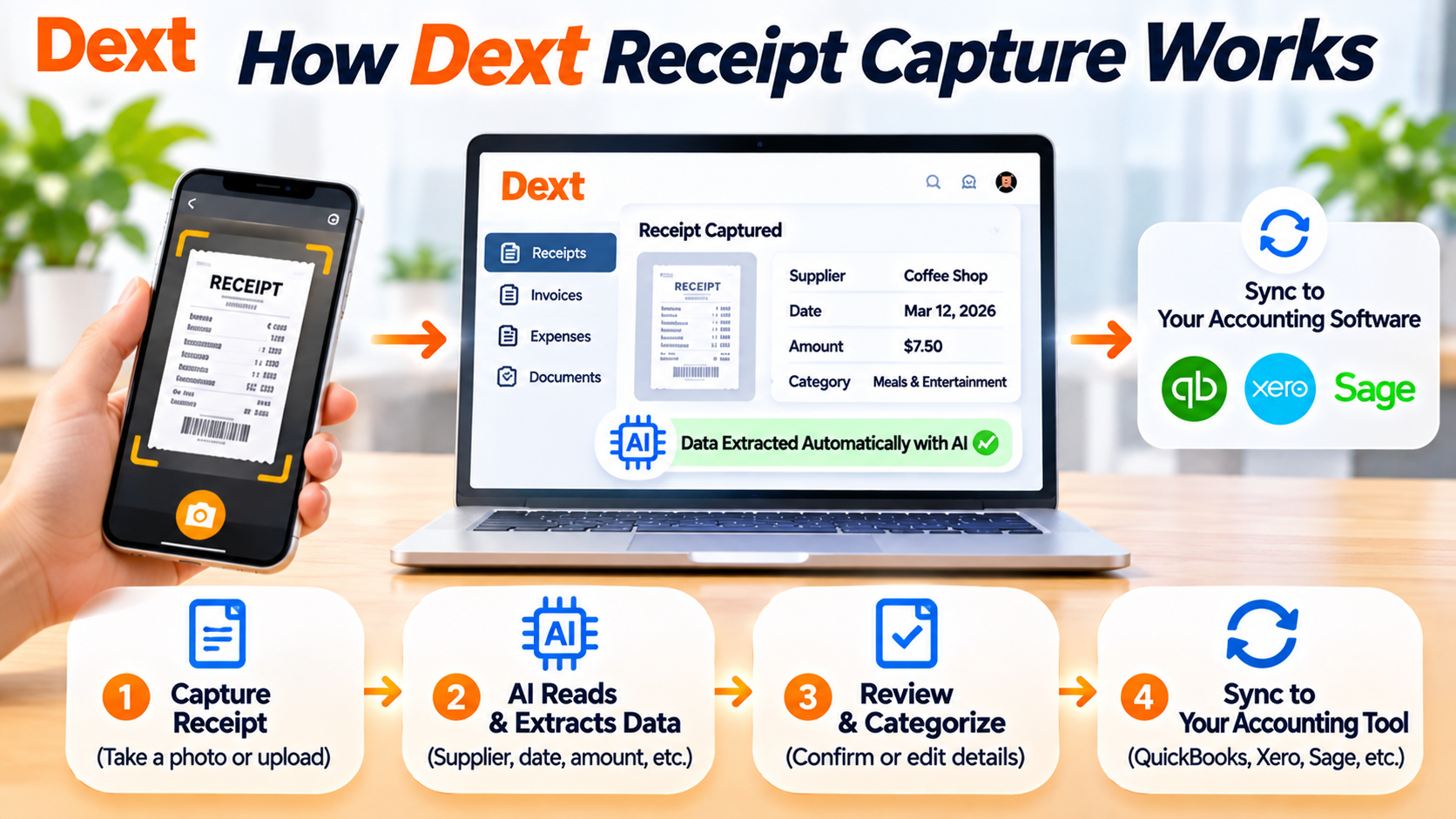
Step 1: Capture Your Receipt
The first step is uploading your receipt to Dext.
Users have several convenient options:
- Take a photo using the Dext mobile app
- Upload a PDF or image from your computer
- Drag and drop files into the web application
- Forward receipts via email
- Upload multiple receipts in bulk
The platform supports a wide range of receipt formats, making it easy to digitize both paper and electronic receipts.
Tip: Capture receipts as soon as you make a purchase to avoid losing important expense records.
Step 2: AI Reads the Receipt Automatically
Once the receipt is uploaded, Dext's AI immediately begins processing the document.
Using advanced OCR technology, the system identifies important information such as:
- Merchant name
- Purchase date
- Receipt number
- Currency
- Total amount
- Tax or VAT
- Payment method
This process takes only a few seconds and eliminates the need for manual typing.
Step 3: Review the Extracted Data
Although Dext's AI is highly accurate, users can quickly review the extracted information before approving it.
You can verify:
- Supplier details
- Transaction date
- Expense amount
- Tax information
- Currency
- Receipt image
If necessary, minor edits can be made before publishing.
This review step helps maintain accurate bookkeeping records.
Step 4: Categorize the Expense
Next, Dext recommends the appropriate bookkeeping category.
Depending on your accounting setup, the platform can suggest:
- Office Expenses
- Travel Expenses
- Meals and Entertainment
- Software Subscriptions
- Utilities
- Marketing Costs
As Dext learns from previous transactions, its recommendations become increasingly accurate.
Step 5: Publish to Your Accounting Software
After approval, the receipt can be published directly into your connected accounting software.
Dext integrates with leading platforms, including:
- QuickBooks Online
- Xero
- Sage
- FreeAgent
- Zoho Books
This seamless synchronization removes duplicate data entry and keeps financial records up to date.
Step 6: Store Receipts Securely
Every uploaded receipt is securely stored in Dext's cloud-based document library.
Users can search receipts by:
- Supplier
- Date
- Amount
- Category
- Keyword
Instead of sorting through paper files, businesses can locate documents within seconds during audits, tax preparation, or financial reviews.
Benefits of Dext Receipt Capture
Using Dext Receipt Capture offers several advantages:
- Eliminate manual receipt entry
- Reduce bookkeeping errors
- Save hours every month
- Improve expense tracking
- Keep digital copies of every receipt
- Simplify tax preparation
- Speed up month-end bookkeeping
- Improve collaboration with accountants
For businesses processing dozens or hundreds of receipts each month, these time savings can be significant.
Why Businesses Choose Dext Receipt Capture
Receipt Capture is one of Dext's most valuable features because it automates one of the most repetitive bookkeeping tasks. Instead of manually organizing receipts and entering financial data, businesses can complete the entire process in minutes.
Whether you're a freelancer tracking expenses, a growing business managing employee purchases, or an accounting firm handling multiple clients, Dext helps simplify receipt management while improving accuracy and productivity.
Final Thoughts
Dext Receipt Capture combines AI, OCR, and cloud technology to transform how businesses manage receipts. From capturing documents with a smartphone to automatically extracting data and publishing transactions into accounting software, every step is designed to save time and reduce manual work.
If your business is looking for a smarter way to manage receipts, Dext offers one of the most efficient and user-friendly solutions available today.
Frequently Asked Questions
What types of receipts can Dext capture?
Dext supports paper receipts, digital receipts, PDF documents, scanned images, and receipts submitted via email or mobile devices.
Does Dext automatically read receipt information?
Yes. Dext uses AI-powered OCR technology to extract merchant names, dates, totals, taxes, currencies, and other key information automatically.
Can I upload multiple receipts at once?
Yes. Dext supports bulk uploads, making it easy to process large numbers of receipts efficiently.
Does Dext keep copies of uploaded receipts?
Yes. Every receipt is securely stored in the cloud, allowing users to search, retrieve, and share documents whenever needed.








Write Your Review
No reviews yet. Be the first to share your experience!