
A Customer Relationship Management (CRM) system is only valuable if your team adopts it quickly and uses it consistently. Fortunately, Close CRM is designed with simplicity in mind, making it one of the easiest sales CRMs to implement.
Unlike many enterprise CRM platforms that require weeks of setup and extensive customization, Close CRM allows businesses to create an account, import contacts, and begin managing sales opportunities within a few hours.
Whether you're switching from spreadsheets or migrating from another CRM, this step-by-step guide will help you set up Close CRM efficiently and build your first sales pipeline.
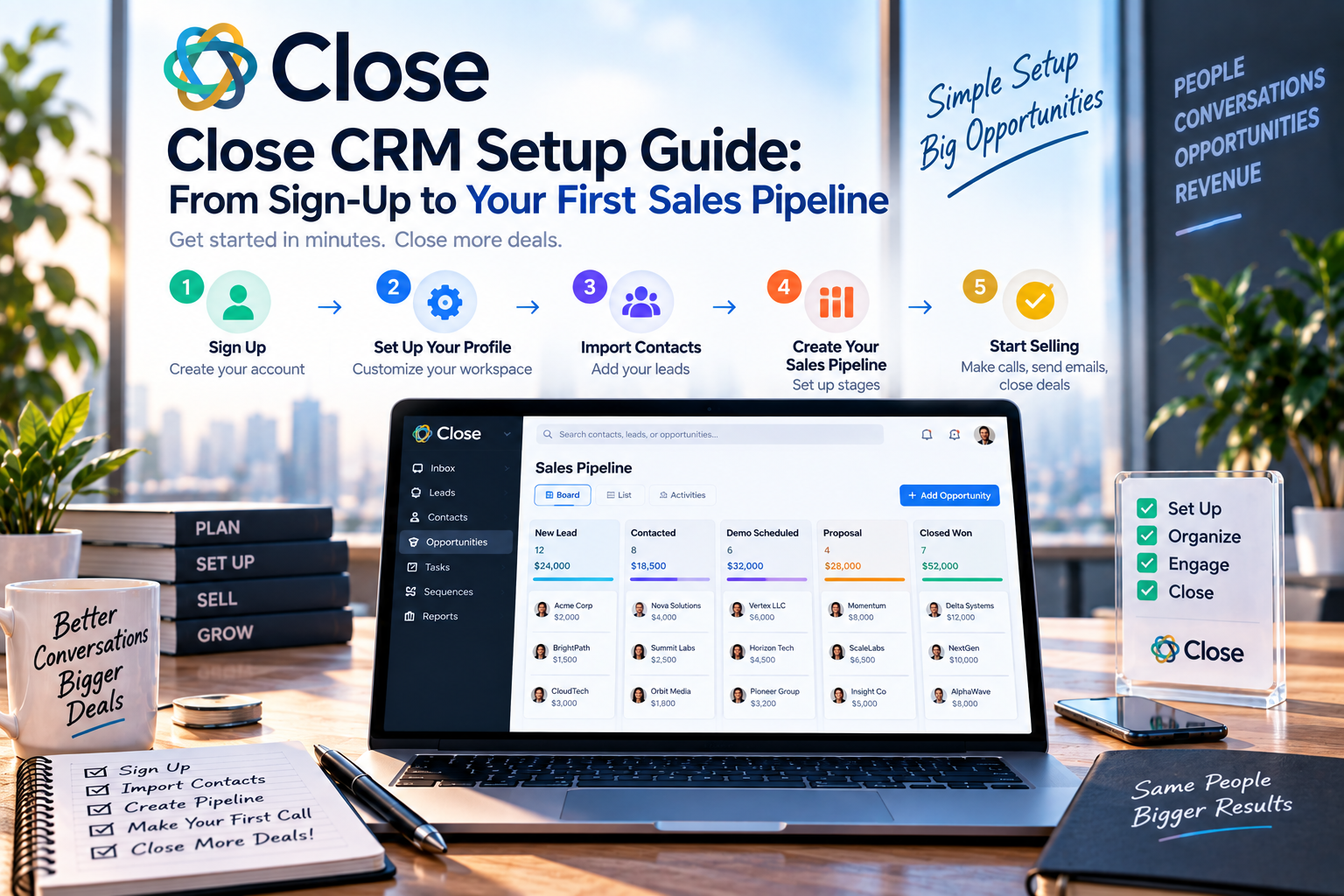
Step 1: Create Your Close CRM Account
Getting started is straightforward.
Simply visit the Close CRM website and sign up for a free trial using your business email address.
During registration, you'll be asked to provide:
- Company name
- Business email
- Team size
- Industry
- Sales goals
This information helps Close personalize your onboarding experience.
After verifying your email, you'll be taken directly to your workspace.
Step 2: Configure Your Workspace
Before importing leads, spend a few minutes customizing your workspace.
Recommended settings include:
- Company profile
- Time zone
- Currency
- User roles
- Notifications
- Business hours
If multiple people will use the CRM, invite your team members now so everyone starts with the same configuration.
Assign appropriate permissions based on each person's responsibilities.
Step 3: Import Your Contacts
Your CRM becomes valuable only after your customer data is available.
Close allows you to import contacts from:
- CSV files
- Existing CRM platforms
- Google Contacts
- Other supported integrations
Before importing, make sure your spreadsheet includes:
- Name
- Company
- Email address
- Phone number
- Job title
- Lead source
- Notes
Cleaning duplicate or outdated records before importing will improve your CRM's accuracy.
Step 4: Build Your First Sales Pipeline
The sales pipeline is the heart of Close CRM.
It gives your team a visual overview of every opportunity and helps track prospects throughout the buying journey.
A simple pipeline might include these stages:
- New Lead
- Contacted
- Discovery Call
- Product Demo
- Proposal Sent
- Negotiation
- Closed Won
- Closed Lost
Each stage should reflect your actual sales process.
Avoid creating too many stages, as overly complex pipelines are harder to manage and maintain.
Step 5: Connect Your Communication Tools
One of Close CRM's biggest advantages is its built-in communication features.
Connect your business email to enable:
- Email synchronization
- Email tracking
- Templates
- Automated sequences
You can also configure:
- Built-in calling
- SMS messaging
- Calendar integration
Having every communication channel connected ensures that all customer interactions are automatically recorded.
Step 6: Create Custom Fields
Every business tracks different information.
Close allows you to create custom fields such as:
- Industry
- Company size
- Annual revenue
- Product interest
- Lead priority
- Sales territory
Custom fields help organize leads and improve reporting accuracy.
Only create fields your team actually uses to keep the CRM clean and efficient.
Step 7: Set Up Workflow Automation
Automation saves time and ensures consistency.
Begin with simple workflows such as:
- Assign new leads automatically
- Create follow-up tasks after calls
- Send welcome emails
- Schedule reminder notifications
- Move deals to the next stage after specific activities
As your team grows, you can introduce more advanced automations.
Step 8: Organize Daily Sales Activities
Successful sales teams develop consistent daily habits.
Within Close CRM, representatives should:
- Review new leads
- Complete scheduled tasks
- Make outbound calls
- Send follow-up emails
- Update opportunity stages
- Record meeting notes
Keeping activities current ensures managers always have an accurate view of the sales pipeline.
Step 9: Monitor Your Sales Dashboard
Once your team begins using Close, regularly review the reporting dashboard.
Useful metrics include:
- Number of calls made
- Emails sent
- Response rates
- Pipeline value
- Conversion rates
- Deals won
- Revenue forecast
Monitoring these KPIs helps identify successful strategies and areas for improvement.
Best Practices for New Users
To maximize the value of Close CRM, follow these best practices:
Keep Your Data Clean
Remove duplicate contacts and update outdated information regularly.
Standardize Your Pipeline
Ensure every sales representative follows the same sales stages.
Automate Repetitive Tasks
Use automation for reminders, task creation, and follow-up sequences.
Use Notes Consistently
Record key details after every customer interaction.
Review Reports Weekly
Sales reports provide valuable insights into pipeline health and team performance.
Common Setup Mistakes to Avoid
Many businesses make avoidable mistakes during CRM implementation.
Skipping Team Training
Even user-friendly software requires basic onboarding.
Creating Too Many Pipeline Stages
Simple pipelines are easier to manage and produce better reporting.
Ignoring Automation
Manual processes waste valuable selling time.
Failing to Update Deals
Outdated opportunities reduce forecast accuracy.
Importing Poor-Quality Data
Incorrect or duplicate records create confusion across the sales team.
Avoiding these mistakes will improve user adoption and long-term success.
How Long Does Setup Take?
For most small and medium-sized businesses, Close CRM can be fully operational within one business day.
A typical implementation timeline is:
- Account creation: 10–15 minutes
- Workspace configuration: 20–30 minutes
- Contact import: 30–60 minutes
- Pipeline creation: 20–30 minutes
- Communication setup: 20–30 minutes
- Basic automation: 30–45 minutes
Larger organizations with complex workflows may require additional planning, but Close generally offers a much faster deployment than many enterprise CRM platforms.
Final Verdict
Close CRM is one of the easiest sales CRM platforms to implement, making it an excellent choice for startups, SMBs, and growing sales teams. Its intuitive interface, built-in communication tools, and straightforward setup process allow businesses to begin managing leads and opportunities with minimal technical expertise.
By following this guide, you can create a structured sales pipeline, automate routine tasks, and centralize customer communication in just a few hours. More importantly, establishing a clean CRM foundation from the beginning will improve team adoption, increase productivity, and support long-term sales growth.
If you're looking for a CRM that combines ease of use with powerful sales features, Close CRM is well worth trying.







Write Your Review
No reviews yet. Be the first to share your experience!