
Software development has entered a new era.
Artificial Intelligence is no longer just a tool for generating code snippets—it has become a powerful development partner that can assist with planning, coding, debugging, testing, documenting, reviewing, and even deploying software.
Today's developers are using AI to automate repetitive tasks, improve code quality, accelerate learning, and focus more on solving business problems rather than writing boilerplate code.
The goal isn't to replace software engineers.
The goal is to help developers build better software faster.
In this module, you'll learn how AI fits into the modern software development lifecycle, explore the best AI coding tools, and discover practical workflows that can significantly improve your productivity.
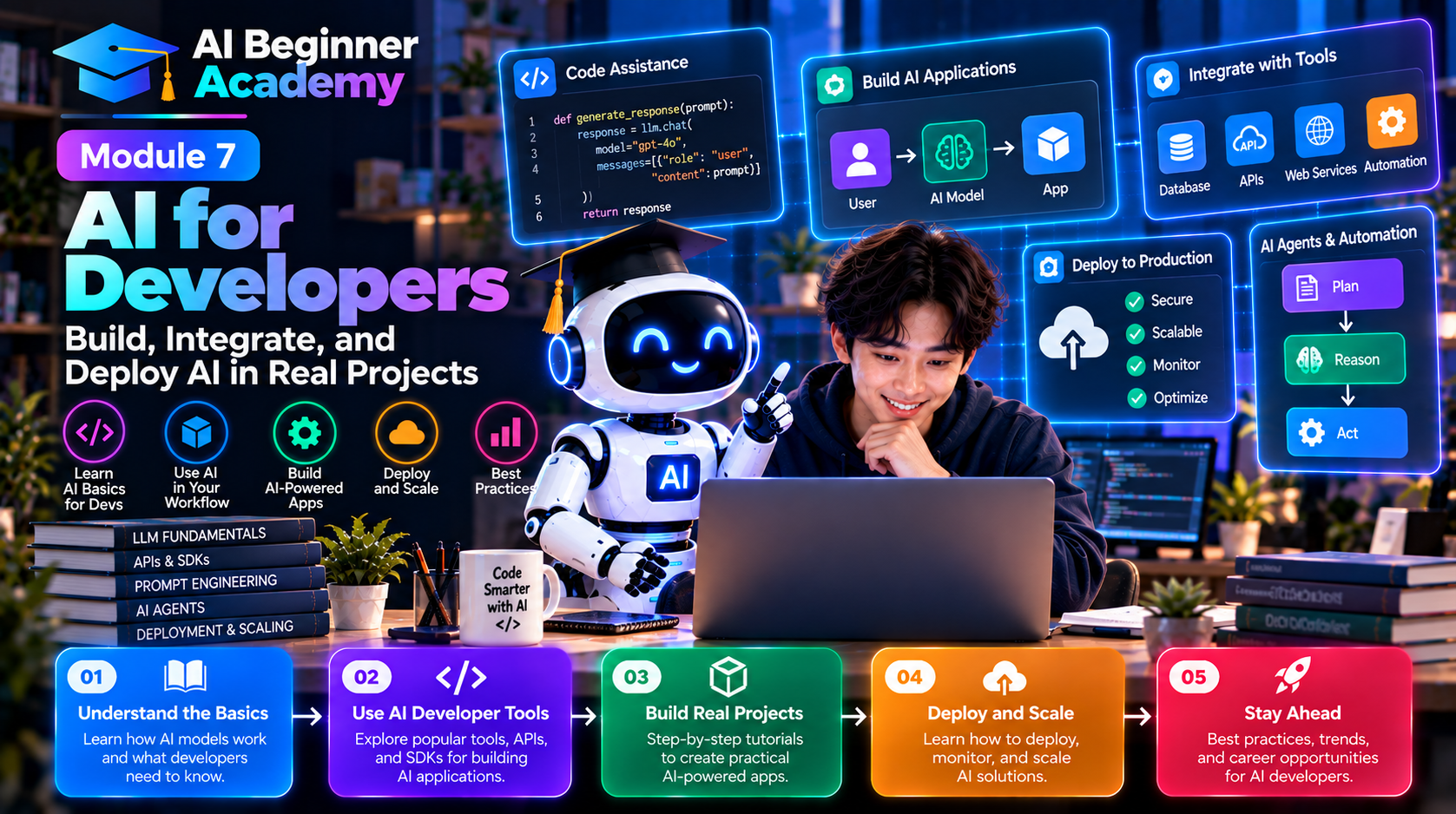
Why Developers Should Use AI
Modern software projects are becoming increasingly complex.
Developers spend a large portion of their time on repetitive work such as:
- Writing boilerplate code
- Reading documentation
- Debugging
- Refactoring
- Creating unit tests
- Writing SQL queries
- Reviewing pull requests
- Documenting APIs
AI can automate many of these tasks, allowing developers to spend more time on architecture, design, and business logic.
AI Across the Software Development Lifecycle
AI can support every stage of development.
Requirements
      ↓
Architecture
      ↓
Coding
      ↓
Testing
      ↓
Debugging
      ↓
Code Review
      ↓
Documentation
      ↓
Deployment
      ↓
Monitoring
Instead of using AI only while coding, think of it as a partner throughout the entire software lifecycle.
Best AI Coding Tools
| Tool | Best For |
|---|---|
| ChatGPT | General programming, debugging, architecture discussions |
| Claude | Large codebases, documentation, code explanation |
| GitHub Copilot | Inline code completion inside IDEs |
| Cursor AI | AI-first code editor with intelligent assistance |
| Gemini Code Assist | Google Cloud development and enterprise coding |
| Amazon Q Developer | AWS development workflows |
| Windsurf | AI-native development environment |
| Codeium | Free AI coding assistant |
| Continue.dev | Open-source AI coding assistant |
| Tabnine | AI-powered code completion |
Choose the tool that best fits your language, IDE, and workflow.
Common AI Use Cases
1. Generate Boilerplate Code
Instead of writing repetitive setup code manually, ask AI to generate:
- REST APIs
- CRUD operations
- Authentication
- Database models
- Configuration files
Example Prompt
Generate a REST API in Python using FastAPI with CRUD operations for a Product resource.
2. Debug Faster
AI can explain errors, identify likely causes, and suggest fixes.
Example Prompt
Explain why this JavaScript function throws a “TypeError” and provide a corrected version.
Always test the suggested solution before using it in production.
3. Learn New Technologies
AI acts as an on-demand mentor.
You can ask it to explain:
- Frameworks
- Design patterns
- Algorithms
- APIs
- Cloud services
Example Prompt
Explain Dependency Injection with simple examples in C#.
4. Refactor Existing Code
Improve readability and maintainability without changing behavior.
Example Prompt
Refactor this function to improve readability, reduce duplication, and follow SOLID principles.
AI can often suggest cleaner implementations, but you should review changes carefully.
5. Generate Unit Tests
Writing tests is essential but time-consuming.
AI can generate:
- Unit tests
- Integration tests
- Mock data
- Edge cases
- Test documentation
Example Prompt
Generate comprehensive unit tests for this service using Jest. Include positive, negative, and edge-case scenarios.
6. Explain Legacy Code
Working with unfamiliar codebases becomes easier when AI explains:
- Function behavior
- Class relationships
- Business logic
- Data flow
- Dependencies
Example Prompt
Explain this code as if I were a junior developer. Include a step-by-step breakdown of how it works.
7. Write SQL Queries
AI is especially useful for database work.
Examples include:
- SELECT statements
- JOINs
- Window functions
- Query optimization
- Database schema design
Example Prompt
Write an SQL query that returns the top five customers by total sales during the last 12 months.
8. Generate Documentation
Good documentation improves collaboration.
AI can create:
- README files
- API documentation
- Architecture overviews
- Code comments
- User guides
Example Prompt
Generate a professional README for this GitHub project, including installation, usage, configuration, and contribution guidelines.
AI-Assisted Software Architecture
AI can help developers design systems by discussing:
- Monolithic architecture
- Microservices
- Event-driven architecture
- Clean Architecture
- Domain-Driven Design (DDD)
- API Gateway patterns
- CQRS
- Event Sourcing
Instead of asking AI to “design my application,” provide business context, expected traffic, scalability requirements, and constraints for more practical recommendations.
AI for Code Reviews
Before submitting a pull request, ask AI to review your code.
It can identify:
- Bugs
- Performance issues
- Security concerns
- Naming improvements
- Code smells
- Maintainability problems
Example Prompt
Review this code for readability, performance, security, and maintainability. Suggest improvements and explain your reasoning.
AI reviews should complement—not replace—human code reviews.
AI and DevOps
AI is increasingly integrated into DevOps workflows.
Common tasks include:
- Writing Dockerfiles
- Creating Kubernetes manifests
- Generating CI/CD pipelines
- Troubleshooting deployments
- Monitoring logs
- Optimizing cloud infrastructure
Example Prompt:
Generate a GitHub Actions workflow that builds, tests, and deploys a Node.js application to Azure App Service.
Best Practices
To use AI effectively as a developer:
- Understand the generated code before using it.
- Verify security-sensitive implementations.
- Keep prompts specific and provide context.
- Use AI to automate repetitive work, not critical decision-making.
- Learn the underlying concepts instead of relying solely on generated solutions.
- Combine AI assistance with version control, automated testing, and peer reviews.
AI should strengthen your engineering process—not replace it.
Common Mistakes
Accepting Code Without Understanding It
Never copy and paste code into production without reviewing it.
Ignoring Security
AI-generated code may not always follow security best practices.
Pay close attention to:
- Authentication
- Authorization
- Input validation
- SQL injection
- Cross-site scripting (XSS)
- Secret management
Using AI as the Only Source of Truth
AI can make mistakes or suggest outdated approaches.
Consult official documentation for frameworks, libraries, and cloud services when accuracy is critical.
Skipping Tests
Always test AI-generated code using automated and manual testing before deployment.
Practice Projects
Strengthen your AI-assisted development skills by building:
- A REST API
- A Todo application
- A personal portfolio website
- A chatbot
- A weather application
- A URL shortener
- A blog platform
- A task management system
- A simple CRM
- A dashboard with charts
Use AI to assist with planning, coding, testing, and documentation for each project.
Recommended AI Development Workflow
Understand Requirements
        ↓
Design Architecture
        ↓
Generate Initial Code
        ↓
Review & Refactor
        ↓
Write Tests
        ↓
Document the Project
        ↓
Deploy
        ↓
Monitor & Improve
Following a structured workflow helps ensure AI-generated code remains maintainable and reliable.
What's Next?
Now that you've learned how AI enhances software development, the next step is using AI to automate repetitive work across applications and business processes.
In Module 8 – AI Automation, you'll learn how to connect AI with productivity tools, build no-code workflows, automate repetitive tasks, and create intelligent AI-powered processes using platforms like Zapier, Make, and n8n.
Final Thoughts
AI is transforming software development—not by replacing developers, but by amplifying their capabilities.
The most successful engineers use AI to eliminate repetitive work, accelerate learning, and improve code quality while continuing to apply critical thinking, architecture knowledge, and business understanding.
Remember this principle:
AI writes code. Developers build solutions.
The future belongs to engineers who know how to collaborate effectively with AI, combining automation with human expertise to deliver reliable, secure, and valuable software.

Write Your Review
No reviews yet. Be the first to share your experience!