
Imagine completing hours of repetitive work without lifting a finger.
Every day, professionals spend valuable time copying data between applications, sending routine emails, updating spreadsheets, creating reports, scheduling meetings, and performing dozens of repetitive tasks.
Artificial Intelligence combined with workflow automation is changing the way people work.
Instead of asking AI questions one at a time, you can build automated workflows that trigger actions, make decisions, generate content, and communicate across multiple applications—all with minimal human intervention.
This is the future of productivity.
In this module, you'll learn the fundamentals of AI automation, discover the best automation platforms, and learn how to build intelligent workflows that save time and reduce manual effort.
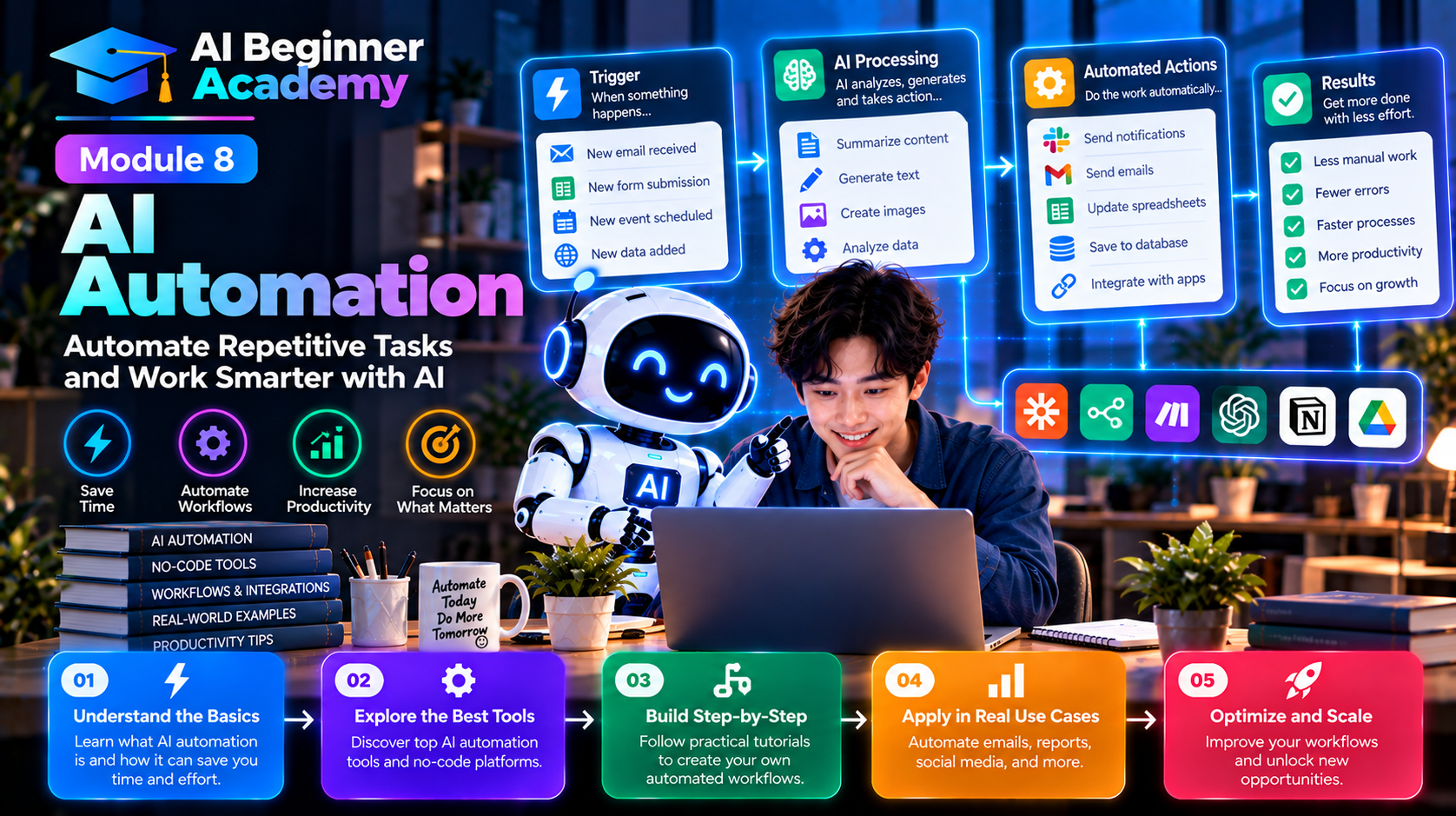
What Is AI Automation?
AI Automation combines artificial intelligence with workflow automation to perform tasks automatically.
Traditional automation follows predefined rules.
For example:
If a customer submits a form, send a confirmation email.
AI automation goes much further.
It can:
- Understand natural language
- Summarize documents
- Generate content
- Classify information
- Analyze sentiment
- Make recommendations
- Decide what action to take based on context
Rather than simply following instructions, AI adds intelligence to automated workflows.
Traditional Automation vs AI Automation
| Traditional Automation | AI Automation |
|---|---|
| Rule-based | Context-aware |
| Fixed workflows | Flexible decision-making |
| Simple triggers | Natural language understanding |
| Limited adaptability | Learns from prompts and data |
| Minimal reasoning | Can analyze and generate content |
The combination of automation and AI enables workflows that were previously impossible without human involvement.
How AI Automation Works
A typical AI workflow follows this sequence:
Trigger
      ↓
Collect Data
      ↓
AI Analysis
      ↓
Decision
      ↓
Execute Actions
      ↓
Notify Users
For example:
- A customer submits a support request.
- AI categorizes the issue.
- AI drafts a response.
- The ticket is assigned to the appropriate team.
- The customer receives a personalized confirmation email.
Best AI Automation Platforms
| Platform | Best For |
|---|---|
| Zapier | Business automation with thousands of integrations |
| Make | Visual workflow design and advanced logic |
| n8n | Open-source automation and self-hosting |
| Microsoft Power Automate | Microsoft 365 and enterprise environments |
| Pipedream | Developer-friendly API automation |
| Activepieces | Open-source business automation |
| Langflow | Building AI agent workflows |
| Flowise | Visual AI and LLM orchestration |
| Dify | AI application development and workflow management |
Each platform offers different strengths depending on your technical background and business requirements.
Common AI Automation Use Cases
1. Email Automation
Automatically:
- Summarize incoming emails
- Categorize messages
- Draft replies
- Create follow-up reminders
- Archive completed conversations
Example Workflow
New Email
↓
AI summarizes content
↓
Identify priority
↓
Create task
↓
Send notification
2. Content Creation
Automate:
- Blog outlines
- Social media posts
- Product descriptions
- Email newsletters
- SEO metadata
Example Workflow
New blog topic
↓
AI writes draft
↓
Generate featured image
↓
Create LinkedIn post
↓
Schedule publication
3. Customer Support
AI can:
- Answer FAQs
- Classify tickets
- Generate responses
- Escalate complex issues
- Create knowledge base articles
This reduces response time while improving customer satisfaction.
4. Sales Automation
Automatically:
- Qualify leads
- Summarize meetings
- Generate proposals
- Update CRM records
- Schedule follow-up emails
Sales teams spend less time on administration and more time building customer relationships.
5. Marketing Automation
AI can assist with:
- Campaign planning
- Audience segmentation
- Ad copy generation
- Performance analysis
- Personalized messaging
Automation ensures campaigns remain consistent and scalable.
6. Document Processing
AI can process:
- Invoices
- Contracts
- Purchase orders
- Resumes
- Reports
- Financial documents
Typical workflow:
Upload document
↓
Extract information
↓
Validate data
↓
Store in database
↓
Notify stakeholders
7. Meeting Automation
Automatically:
- Record meetings
- Generate transcripts
- Summarize discussions
- Extract action items
- Update project management tools
This eliminates hours of manual note-taking.
AI Agents vs Workflow Automation
Traditional workflows follow predefined paths.
AI Agents can:
- Plan tasks
- Use multiple tools
- Retrieve information
- Make decisions
- Adapt to changing situations
Example:
A travel planning agent could:
- Search flights
- Compare hotels
- Analyze weather
- Create an itinerary
- Send recommendations
All within a single workflow.
This represents the next generation of automation.
Building Your First AI Workflow
Start with a simple automation.
Example:
Daily Content Workflow
Trigger:
Every morning at 8:00 AM
↓
AI searches industry news
↓
Generate summary
↓
Write LinkedIn post
↓
Create newsletter draft
↓
Send to your email
One automation can save hours every week.
AI Automation for Different Professions
Marketing
- Campaign planning
- Social media scheduling
- Lead nurturing
- SEO reporting
Sales
- CRM updates
- Proposal generation
- Customer follow-ups
- Pipeline summaries
Human Resources
- Resume screening
- Interview scheduling
- Employee onboarding
- Policy documentation
Finance
- Invoice processing
- Expense categorization
- Financial summaries
- Budget reporting
Customer Service
- AI chatbots
- Ticket routing
- Response generation
- Customer feedback analysis
Software Development
- CI/CD notifications
- Documentation generation
- Pull request summaries
- Issue classification
Best Practices
To build reliable AI automations:
- Start with one repetitive task.
- Test workflows thoroughly before deploying them.
- Add human approval for high-risk actions.
- Log workflow activity for auditing.
- Monitor performance regularly.
- Protect sensitive data with appropriate security controls.
Automation should reduce risk—not create it.
Common Mistakes
Automating Poor Processes
AI cannot fix inefficient workflows.
Optimize the process before automating it.
Giving AI Unlimited Authority
Keep humans involved for:
- Financial approvals
- Legal decisions
- Security changes
- Customer disputes
Human oversight remains essential.
Ignoring Error Handling
Every workflow should define what happens if:
- AI fails to respond
- External services are unavailable
- Required data is missing
- Validation fails
Robust workflows anticipate failures.
Practice Projects
Build these automations to gain hands-on experience:
- AI email summarizer.
- Automatic meeting note generator.
- Blog-to-social-media workflow.
- AI customer support assistant.
- Daily news briefing.
- Invoice processing workflow.
- CRM lead qualification.
- Weekly analytics report.
- AI-powered knowledge base updater.
- Employee onboarding assistant.
Each project reinforces a different aspect of AI automation.
Recommended AI Automation Workflow
Identify Repetitive Task
          ↓
Choose Automation Platform
          ↓
Connect Applications
          ↓
Design Workflow
          ↓
Add AI Processing
          ↓
Test
          ↓
Deploy
          ↓
Monitor & Optimize
Successful automation is an ongoing process of refinement rather than a one-time setup.
What's Next?
You've now learned how AI can automate repetitive work across business applications.
In Module 9 – Advanced AI Concepts, you'll move beyond everyday productivity and explore the technologies powering modern AI systems, including Retrieval-Augmented Generation (RAG), Vector Databases, AI Memory, Multi-Agent Systems, AI Gateways, LLM Routers, AI Monitoring, Governance, and Enterprise AI Architecture.
Understanding these concepts will prepare you for the next generation of AI-powered applications.
Final Thoughts
AI automation is more than connecting apps—it's about creating intelligent systems that understand context, make informed decisions, and execute work efficiently.
The organizations gaining the greatest advantage are not simply using AI to answer questions; they are embedding AI into their everyday processes to reduce repetitive work, improve consistency, and increase productivity.
Start with one simple workflow, measure the time you save, and expand from there. Over time, you'll build an ecosystem of AI-powered automations that lets you focus on high-value work while routine tasks run in the background.



Write Your Review
No reviews yet. Be the first to share your experience!