
Sales teams spend a significant portion of their day on repetitive tasks such as assigning leads, sending follow-up emails, updating deal stages, and creating reminders. While these activities are essential, they reduce the time available for building relationships and closing deals.
Close CRM helps solve this challenge with workflow automation. Instead of performing the same actions manually, businesses can create automated workflows that keep sales processes running smoothly and consistently. Whether you're a startup or a growing sales organization, automation can improve efficiency, reduce human error, and ensure that no opportunity is overlooked.
This beginner's guide explains how Close CRM workflow automation works, its key benefits, and how to build your first automated workflow.
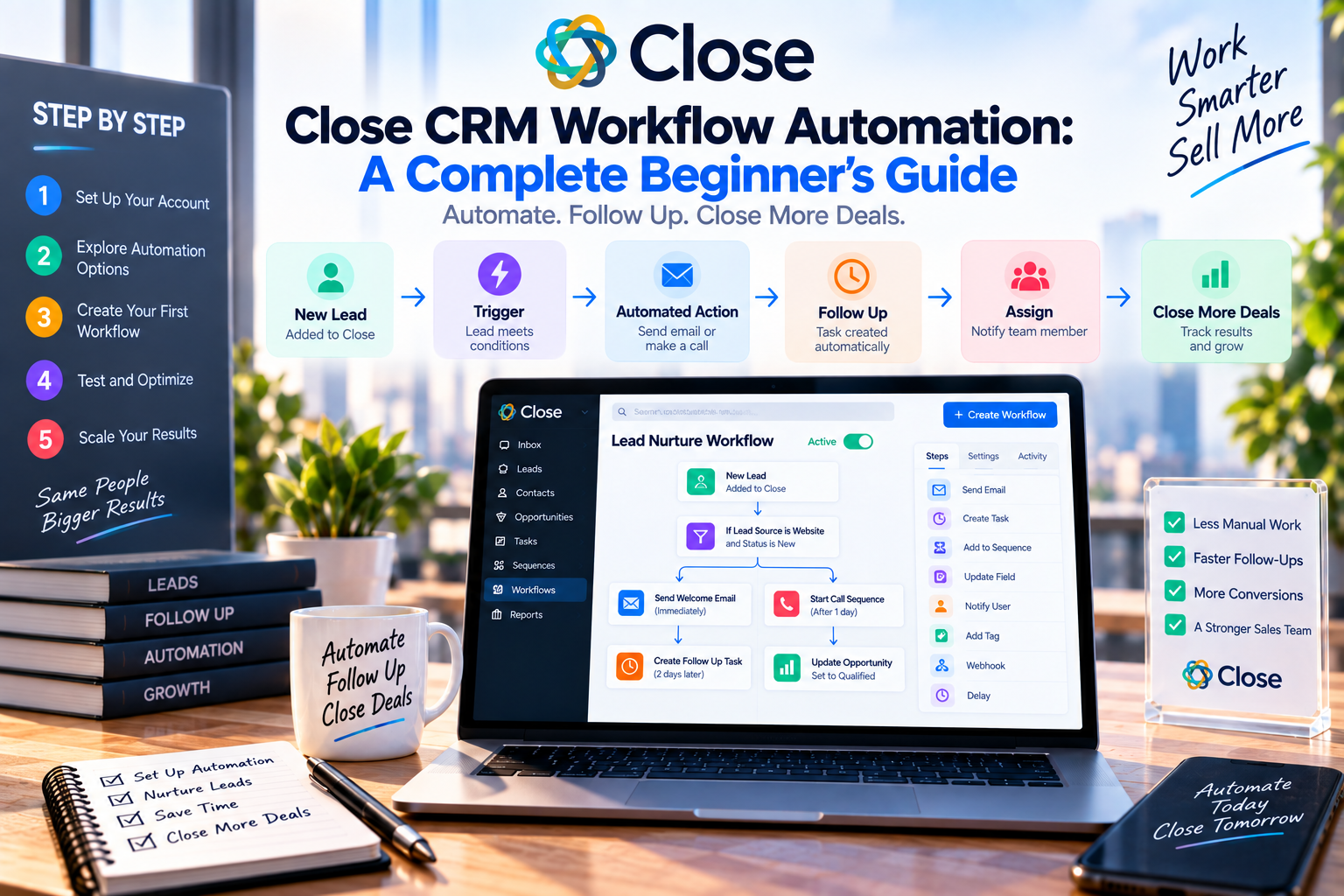
What Is Workflow Automation?
Workflow automation is the process of using predefined rules to perform repetitive tasks automatically.
Instead of manually completing every action, Close CRM can trigger workflows when specific events occur.
For example:
- A new lead is created.
- A deal moves to a new stage.
- A customer replies to an email.
- A task reaches its due date.
The system then performs the appropriate action automatically, helping sales teams stay organized and responsive.
Why Workflow Automation Matters
Manual processes often lead to delays, forgotten follow-ups, and inconsistent customer experiences.
Automation helps businesses:
- Save time
- Reduce administrative work
- Standardize sales processes
- Improve response times
- Increase productivity
- Minimize human error
By automating routine tasks, sales representatives can focus on conversations that generate revenue.
Common Workflow Automations in Close CRM
1. Automatic Lead Assignment
When a new lead enters the CRM, it can be automatically assigned to the appropriate sales representative based on territory, industry, or workload.
This ensures every lead receives prompt attention.
2. Follow-Up Email Sequences
Instead of manually sending reminder emails, Close CRM can automatically enroll prospects into personalized email sequences.
For example:
- Welcome email
- Product information
- Customer success story
- Meeting invitation
Consistent follow-up significantly improves engagement and conversion rates.
3. Task Creation
After completing a sales call or meeting, Close CRM can automatically create follow-up tasks with due dates.
This helps representatives stay organized while reducing the risk of forgotten opportunities.
4. Pipeline Updates
As deals progress through the sales cycle, workflows can automatically update opportunity stages and notify relevant team members.
This keeps everyone informed without requiring manual updates.
5. Reminder Notifications
Close CRM can send reminders before scheduled meetings, proposal deadlines, or follow-up calls, ensuring important activities are never missed.
How to Create Your First Workflow
Getting started with automation is straightforward.
Step 1: Identify Repetitive Tasks
Begin by listing activities your sales team performs every day, such as assigning leads or sending follow-up emails.
Step 2: Define a Trigger
Choose the event that starts the workflow.
Examples include:
- New lead added
- Deal stage changed
- Email received
- Task completed
Step 3: Choose the Action
Next, decide what Close CRM should do automatically.
Common actions include:
- Assign a user
- Send an email
- Create a task
- Update a field
- Move a deal to another stage
Step 4: Test the Workflow
Before using automation across your team, test each workflow to ensure it behaves as expected.
Best Practices
To maximize the benefits of workflow automation:
Start Simple
Automate one or two repetitive tasks before building more advanced workflows.
Keep Processes Consistent
Standardize your sales stages and naming conventions to avoid confusion.
Review Workflows Regularly
As your business grows, update automations to reflect changes in your sales process.
Combine Automation with Personalization
Automation saves time, but important customer interactions should still include a human touch.
Common Mistakes to Avoid
Many businesses make the same automation mistakes.
Avoid:
- Creating overly complex workflows
- Sending too many automated emails
- Forgetting to test workflows
- Ignoring customer responses
- Failing to review automation performance
Automation should simplify your sales process—not make it more complicated.
Real-World Use Cases
SaaS Companies
Automatically send onboarding emails after a prospect signs up for a free trial and create follow-up tasks for sales representatives.
Sales Agencies
Assign new leads to available account managers while triggering personalized outreach sequences.
Recruiting Firms
Schedule interview reminders and create follow-up tasks after candidate calls.
B2B Service Providers
Automate proposal follow-ups and notify account managers when prospects engage with emails.
Benefits of Workflow Automation
Businesses using Close CRM automation often experience:
- Faster lead response times
- Improved sales consistency
- Higher productivity
- Better customer engagement
- More accurate CRM data
- Reduced manual work
These improvements allow sales teams to concentrate on high-value activities instead of repetitive administration.
Final Verdict
Workflow automation is one of Close CRM's most valuable features for modern sales organizations. By automating repetitive tasks such as lead assignment, follow-up emails, reminders, and pipeline updates, businesses can streamline operations while maintaining a consistent customer experience.
For beginners, Close CRM makes automation approachable with an intuitive interface and flexible workflow options. Starting with a few simple automations can deliver immediate productivity gains, while more advanced workflows can support long-term business growth.
If your goal is to reduce administrative work and help your sales team focus on closing deals, Close CRM's workflow automation is a feature well worth exploring.






Write Your Review
No reviews yet. Be the first to share your experience!