
When investing in a Customer Relationship Management (CRM) platform, pricing is often one of the biggest deciding factors. While businesses naturally want to minimize software costs, choosing the cheapest option isn't always the best decision. The right CRM should provide enough features to improve sales productivity, automate repetitive tasks, and generate a positive return on investment (ROI).
Close CRM is positioned as a premium sales-focused CRM designed for startups, small businesses, and scaling sales teams. Instead of offering dozens of plans with complicated feature limitations, Close provides a straightforward pricing structure that grows with your business.
In this guide, we'll explain Close CRM's pricing plans, what features are included at each level, and how to determine which plan best fits your organization.
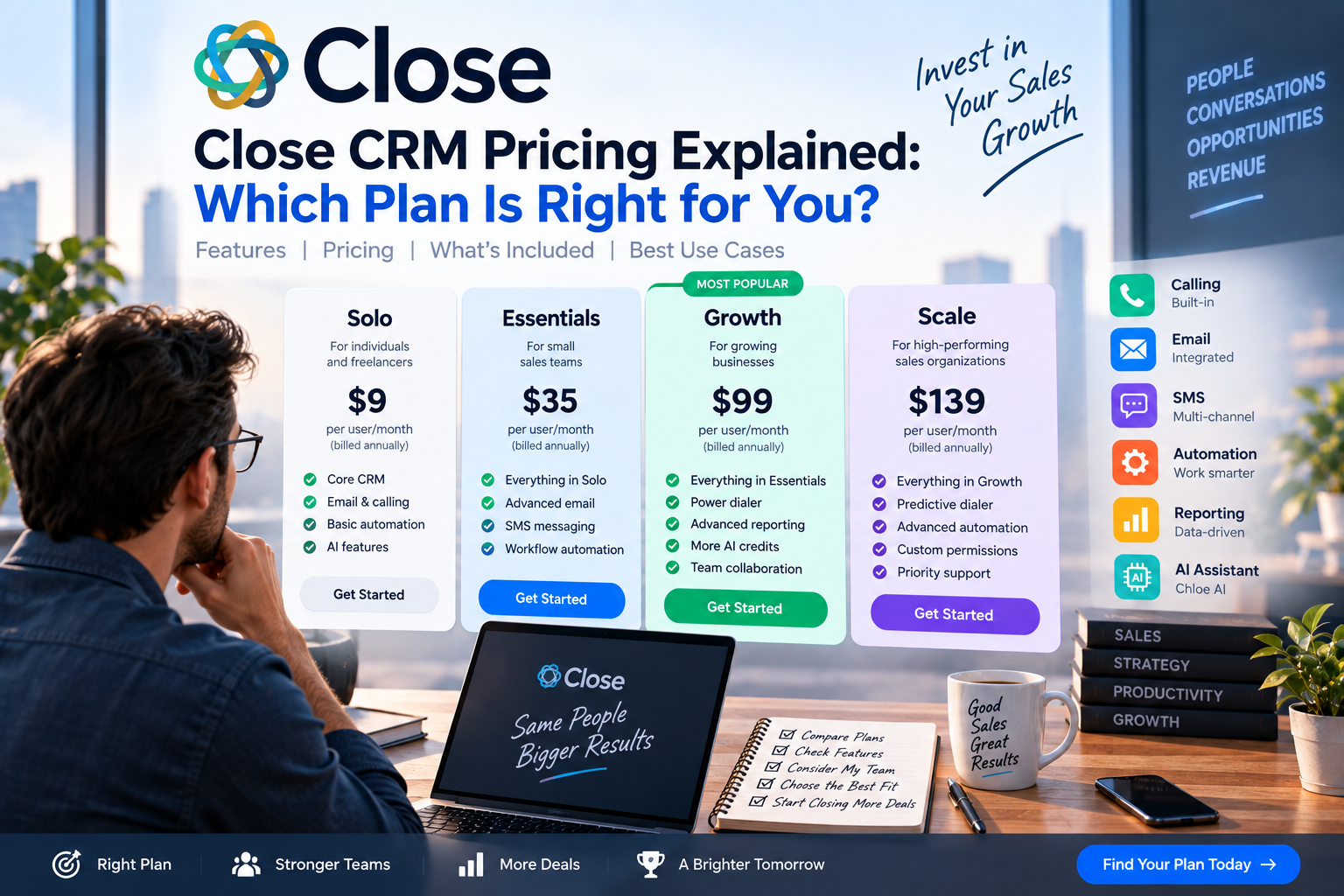
How Close CRM Pricing Works
Close CRM offers subscription-based pricing with both monthly and annual billing options. Businesses that choose annual billing typically receive a lower effective monthly cost compared to paying month by month.
Each plan is designed for a different stage of business growth, allowing companies to upgrade as their sales operations become more advanced.
The main pricing tiers include:
- Base
- Startup
- Professional
- Enterprise
Each plan builds on the previous one by adding more automation, reporting, AI capabilities, and administrative controls.
Base Plan
Best For
- Freelancers
- Small businesses
- Early-stage startups
- Small sales teams
The Base plan provides everything needed to organize contacts and manage a basic sales process.
Typical features include:
- Contact management
- Sales pipeline
- Built-in calling
- Email integration
- Calendar sync
- Task management
- Basic reporting
This plan is ideal for businesses moving away from spreadsheets or adopting a CRM for the first time.
Pros
- Affordable entry point
- Easy to learn
- Includes essential communication tools
Limitations
- Fewer automation features
- Limited advanced reporting
- Basic customization
Startup Plan
Best For
- Growing businesses
- Expanding sales teams
- Companies managing larger lead volumes
The Startup plan introduces additional productivity tools that help teams scale efficiently.
Additional features generally include:
- Workflow automation
- Email sequences
- Multiple pipelines
- Advanced reporting
- Enhanced sales management tools
These capabilities reduce manual work while improving sales consistency.
Pros
- Better automation
- Improved reporting
- Supports growing teams
Limitations
- Some advanced AI features remain unavailable
- Higher monthly investment
Professional Plan
Best For
- Scaling organizations
- High-performing sales teams
- Businesses with complex sales processes
Professional includes more advanced functionality designed to optimize performance.
Features typically include:
- Revenue forecasting
- Advanced workflow automation
- Enhanced reporting
- Team performance analytics
- Additional AI-powered tools
- Greater administrative controls
Sales managers benefit from deeper visibility into pipeline health and team productivity.
Pros
- Strong reporting
- Advanced automation
- Better forecasting
- Increased operational efficiency
Limitations
- Higher subscription cost
- May exceed the needs of smaller businesses
Enterprise Plan
Best For
- Large organizations
- Multi-team sales departments
- Businesses requiring advanced security and administration
Enterprise customers receive the platform's most comprehensive feature set.
Benefits may include:
- Custom onboarding
- Premium customer support
- Advanced user permissions
- Security controls
- Dedicated account management
- Enterprise-level scalability
This plan is designed for companies with complex operational requirements.
Additional Costs to Consider
When evaluating Close CRM pricing, businesses should also consider expenses beyond the monthly subscription.
Possible additional costs include:
Calling Usage
Businesses making a high volume of outbound or international calls may incur additional telephony charges depending on their usage.
Additional Users
As sales teams grow, adding more user licenses increases the overall subscription cost.
Third-Party Integrations
Although Close integrates with many popular applications, some businesses may choose premium third-party tools that carry separate subscription fees.
Planning for these costs helps create a more accurate CRM budget.
Is Close CRM Worth the Price?
Although Close CRM is not the cheapest CRM available, it offers excellent value by combining multiple tools into one platform.
Instead of purchasing separate software for:
- CRM
- Business phone system
- Email tracking
- SMS messaging
- Sales automation
Close provides these capabilities within a single solution.
For many businesses, consolidating these tools can reduce overall software expenses while improving team efficiency.
Which Plan Should You Choose?
Choose Base If…
- You are starting your first sales process.
- Your sales team has fewer than five representatives.
- You need an affordable CRM with built-in communication tools.
Choose Startup If…
- Your business is growing rapidly.
- You want workflow automation.
- Your team manages hundreds of leads each month.
Choose Professional If…
- Your sales organization relies heavily on forecasting and reporting.
- You manage multiple sales representatives.
- You want advanced AI features and automation.
Choose Enterprise If…
- Your organization has large sales departments.
- Security and permissions are critical.
- You require dedicated onboarding and premium support.
How Close CRM Compares on Pricing
Compared with competitors:
- HubSpot CRM offers a free entry-level plan, but costs can rise significantly as businesses add marketing, sales, and service features.
- Salesforce provides extensive customization but typically requires a larger budget for implementation and ongoing administration.
- Pipedrive is often more affordable for small teams but includes fewer built-in communication features.
- monday CRM is a strong choice for organizations already using monday Work OS, though its sales communication tools are less comprehensive than Close.
- Zoho CRM offers competitive pricing and a broad ecosystem but may require more configuration for advanced sales workflows.
Close CRM sits comfortably in the mid-to-premium pricing category, balancing cost with productivity-focused functionality.
Free Trial
Close CRM offers a free trial that allows businesses to explore the platform before making a commitment.
During the trial, users can:
- Build a sales pipeline
- Import contacts
- Test calling features
- Explore automation
- Evaluate reporting dashboards
Taking advantage of the trial is the best way to determine whether Close fits your team's workflow.
Final Verdict
Close CRM's pricing reflects its position as a premium sales-focused CRM. While the subscription cost may be higher than some entry-level alternatives, the platform delivers substantial value through its built-in calling, email integration, SMS messaging, automation, and AI-powered productivity tools.
For startups and small businesses, the Base plan provides a solid foundation for managing customer relationships. Growing teams will benefit from the Startup plan's automation features, while organizations with more complex sales operations should consider the Professional plan. Large enterprises requiring advanced security and onboarding can take advantage of the Enterprise offering.
Ultimately, the best Close CRM plan depends on your business size, sales process, and growth goals. If your priority is improving sales efficiency with an all-in-one communication platform, Close CRM represents a worthwhile investment that can deliver long-term returns.

Write Your Review
No reviews yet. Be the first to share your experience!