
Outbound calling remains one of the most effective ways for businesses to generate leads, nurture prospects, and close sales. However, manually dialing phone numbers, waiting for calls to connect, and logging call results can consume a significant portion of a sales representative's day.
According to industry research, sales reps often spend less than one-third of their working hours actively selling, with much of their time lost to administrative tasks and repetitive dialing.
CloudTalk's Power Dialer is designed to solve this problem.
By automating the dialing process and integrating seamlessly with CRM systems, Power Dialer enables sales teams to spend less time clicking and more time talking to prospects.
In this guide, we'll explain how CloudTalk Power Dialer works, its key features, and why it's an essential productivity tool for modern outbound sales teams.
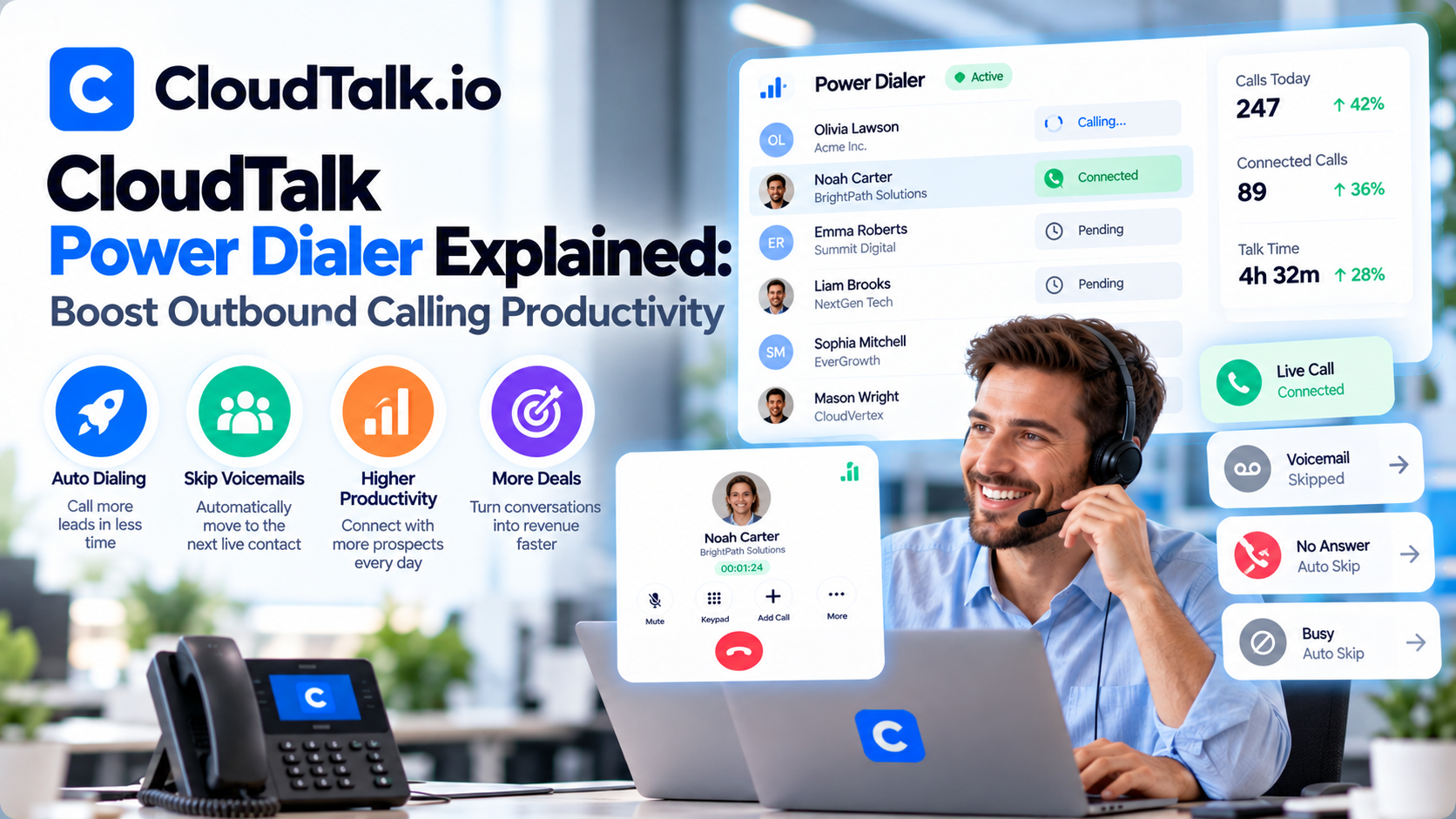
What Is CloudTalk Power Dialer?
Power Dialer is an automated outbound calling feature that places calls from a predefined contact list one after another.
Instead of manually selecting and dialing each phone number, sales representatives simply start the dialing session, and CloudTalk handles the rest.
After each call ends, the system automatically prepares the next contact, significantly reducing downtime between conversations.
The result is:
- More conversations
- Higher productivity
- Faster prospecting
- Better sales performance
How Power Dialer Works
CloudTalk's Power Dialer follows a simple but efficient workflow.
Step 1: Import Contacts
Sales teams upload or synchronize contact lists from their CRM.
These lists may include:
- Sales leads
- Existing customers
- Trial users
- Renewal opportunities
- Follow-up prospects
CloudTalk integrates with platforms such as Salesforce, HubSpot, Pipedrive, Zoho CRM, and many others, ensuring contact data stays up to date.
Step 2: Start the Dialing Session
Once the contact list is ready, the representative clicks Start Dialing.
CloudTalk immediately begins calling the first contact in the queue.
When a call ends, the next number is automatically dialed without requiring manual input.
This eliminates repetitive clicking and saves valuable time throughout the day.
Step 3: Complete the Call
During each conversation, representatives can:
- View customer information
- Access previous call history
- Take notes
- Schedule follow-ups
- Record calls
- Tag outcomes
- Transfer calls if necessary
Because customer data is displayed during the conversation, sales reps can personalize interactions and respond more effectively.
Step 4: Automatically Log Activity
After each call, CloudTalk automatically records:
- Call duration
- Call outcome
- Recordings
- AI-generated summaries (if enabled)
- Notes
- Follow-up tasks
This information is synchronized with the connected CRM, eliminating manual data entry and keeping customer records accurate.
Key Features of CloudTalk Power Dialer
Automated Sequential Dialing
The core function of Power Dialer is automatic sequential dialing.
Representatives no longer need to:
- Search contact lists
- Copy phone numbers
- Dial manually
- Return to the CRM after every conversation
This automation keeps sales momentum high throughout the day.
CRM Integration
CloudTalk integrates with more than 100 business applications.
Popular CRM integrations include:
- HubSpot
- Salesforce
- Pipedrive
- Zoho CRM
- Microsoft Dynamics
- Freshsales
- Zendesk
- Intercom
As calls are completed, customer records are updated automatically, ensuring that every interaction is documented.
Local Presence Dialing
Prospects are more likely to answer calls from familiar local numbers.
CloudTalk allows businesses to display local caller IDs in supported regions, increasing answer rates and improving trust.
This is especially valuable for companies conducting international sales campaigns.
Click-to-Call
In addition to Power Dialer, CloudTalk supports Click-to-Call functionality.
Sales representatives can initiate calls directly from their CRM, browser, or business application without manually entering phone numbers.
This saves time and reduces dialing errors.
Call Recording
Every conversation can be recorded for:
- Training
- Quality assurance
- Compliance
- Coaching
- Performance reviews
Managers can review recordings to identify best practices and help representatives improve their sales techniques.
AI Conversation Intelligence
When combined with CloudTalk's AI Conversation Intelligence, every outbound call becomes a valuable learning opportunity.
The platform automatically generates:
- Call transcripts
- AI summaries
- Sentiment analysis
- Talk-to-listen ratios
- Keyword detection
- Coaching insights
These analytics help sales teams continuously refine their approach and improve conversion rates.
Benefits of Using Power Dialer
Increase Daily Call Volume
Manual dialing wastes valuable time between conversations.
Power Dialer minimizes downtime, allowing representatives to complete significantly more calls each day.
For outbound teams, even a modest increase in conversations can lead to substantial improvements in pipeline growth and revenue.
Improve Sales Productivity
Sales representatives should spend their time selling—not navigating software.
By automating repetitive tasks, Power Dialer allows reps to focus on:
- Building relationships
- Understanding customer needs
- Handling objections
- Closing deals
Higher productivity often translates into better sales performance.
Reduce Administrative Work
Because CloudTalk automatically logs call activity and synchronizes CRM data, representatives spend less time updating records manually.
This improves data accuracy while freeing up time for revenue-generating activities.
Better Coaching Opportunities
Managers gain access to detailed analytics, recordings, and AI-generated insights for every outbound conversation.
Instead of evaluating only a handful of calls, they can identify trends across the entire sales team and provide targeted coaching where it's needed most.
Consistent Sales Processes
Power Dialer encourages standardized workflows by ensuring that every representative follows the same calling sequence and documentation process.
This consistency makes onboarding new salespeople easier and helps maintain quality across the team.
Who Should Use CloudTalk Power Dialer?
SaaS Companies
Sales development representatives (SDRs) can contact more prospects while keeping CRM records up to date automatically.
Recruitment Agencies
Recruiters can quickly reach candidates, schedule interviews, and log conversations without switching between multiple applications.
Financial Services
Insurance brokers, financial advisors, and loan specialists can improve outreach efficiency while maintaining accurate customer records.
Real Estate Agencies
Agents can contact buyers and sellers more consistently, manage follow-ups, and increase appointment bookings.
Customer Success Teams
Account managers can proactively reach existing customers for onboarding, renewals, and satisfaction checks.
Power Dialer vs Manual Dialing
| Manual Dialing | CloudTalk Power Dialer |
|---|---|
| Dial each number manually | Automatic sequential dialing |
| Frequent downtime between calls | Continuous calling workflow |
| Manual CRM updates | Automatic CRM synchronization |
| Higher risk of dialing errors | Accurate automated dialing |
| Lower daily call volume | More conversations per day |
| Time-consuming administration | Streamlined sales workflow |
For teams making dozens or hundreds of outbound calls daily, the efficiency gains are substantial.
Best Practices for Using Power Dialer
To maximize productivity, consider these recommendations:
- Organize contact lists by campaign or priority.
- Integrate your CRM before launching outbound campaigns.
- Use local phone numbers whenever possible.
- Review AI-generated call summaries regularly.
- Analyze answer rates to optimize calling times.
- Record calls for coaching and quality assurance.
- Schedule follow-ups immediately after each conversation.
- Monitor analytics to identify top-performing representatives.
Following these best practices helps sales teams improve both efficiency and conversion rates.
Why Businesses Choose CloudTalk Power Dialer
Organizations choose CloudTalk because it combines automated dialing with AI-powered analytics and seamless CRM integration.
Key advantages include:
- Faster outbound calling
- Improved sales efficiency
- Automatic activity logging
- Reduced administrative workload
- Better coaching insights
- Increased call volume
- Scalable workflows for growing teams
Rather than replacing sales representatives, Power Dialer removes repetitive tasks so they can focus on meaningful customer conversations.





Write Your Review
No reviews yet. Be the first to share your experience!