
Every customer conversation contains valuable information. Questions about products, complaints, purchasing behavior, and support requests reveal what customers need and where businesses can improve. Unfortunately, many companies collect thousands of conversations without ever analyzing them.
That's where Tidio AI Analytics becomes a game changer.
Rather than simply storing chat history, Tidio helps businesses analyze customer interactions, measure support performance, identify trends, and optimize both AI and human support teams. These insights allow companies to make smarter decisions, improve customer satisfaction, and increase operational efficiency.
In this article, we'll explore how Tidio AI Analytics works, its key reporting features, and how businesses can turn customer conversations into meaningful business insights.
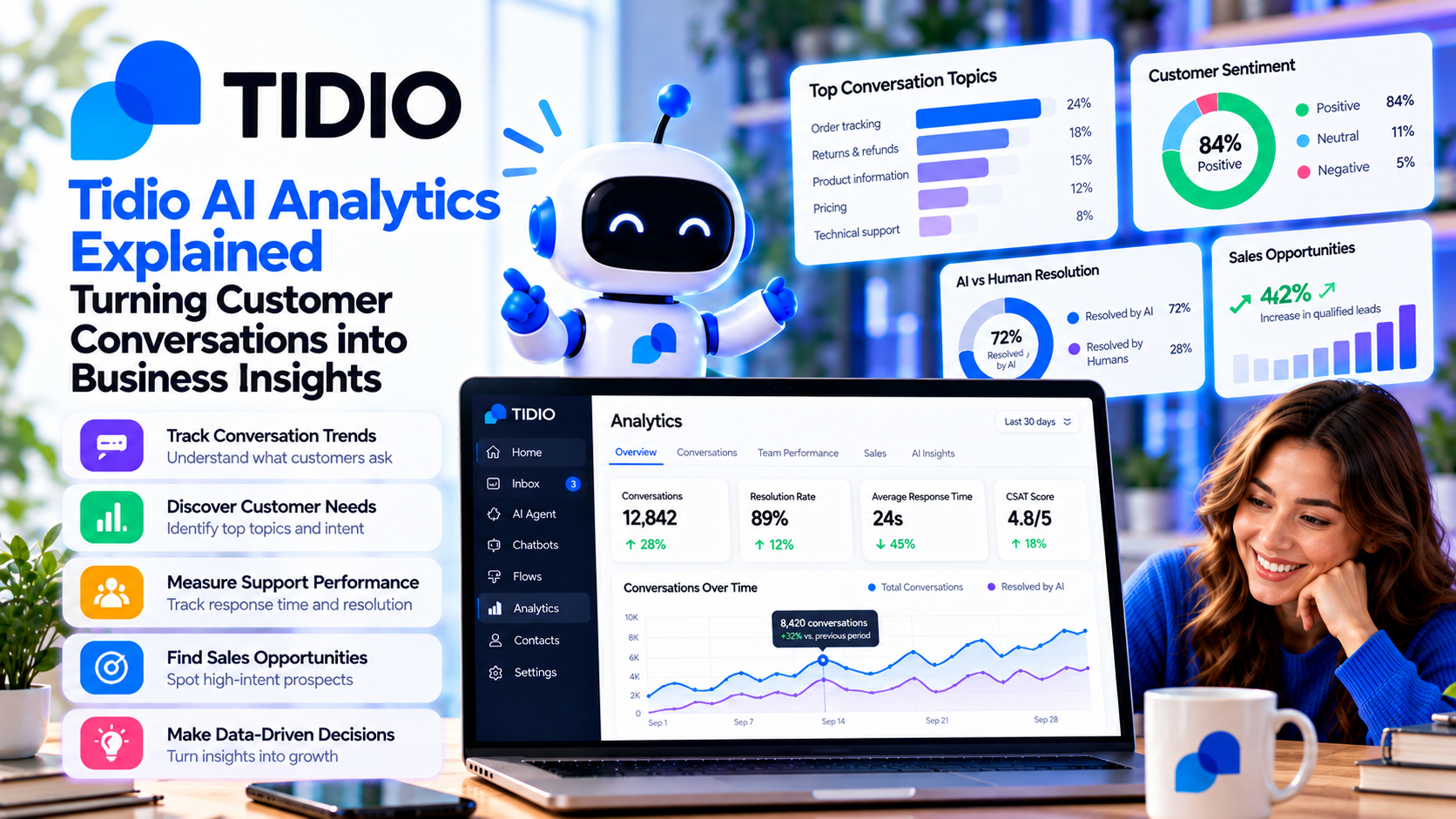
What Is Tidio AI Analytics?
Tidio AI Analytics is a reporting and performance monitoring system built into the Tidio platform.
It collects data from:
- Live chat conversations
- Lyro AI interactions
- Chatbot workflows
- Customer support tickets
- Agent activities
- Website visitor engagement
Instead of manually reviewing hundreds of conversations, managers receive visual reports that highlight trends and performance metrics.
Why Customer Conversation Data Matters
Every customer interaction tells a story.
For example, if dozens of customers ask:
- “Do you offer international shipping?”
- “Is this product in stock?”
- “How long does delivery take?”
These repeated questions indicate opportunities to improve:
- Website content
- Product pages
- FAQ sections
- Checkout process
- Customer communication
Without analytics, these patterns are easy to miss.
By monitoring conversation data, businesses can proactively solve problems before they generate even more support requests.
Measuring AI Performance
One of the most valuable aspects of Tidio AI Analytics is tracking the effectiveness of Lyro AI Agent.
Businesses can monitor:
- AI conversation volume
- AI resolution rate
- Escalation rate
- Customer satisfaction
- Frequently asked questions
- Topics AI cannot answer
These insights help teams improve their knowledge base and expand AI capabilities over time.
For example, if Lyro frequently transfers refund-related questions to human agents, it may indicate that additional refund documentation should be added to the knowledge base.
Tracking Support Team Performance
Analytics also help managers understand how human support agents perform.
Important metrics include:
First Response Time
Measures how quickly agents reply to customer inquiries.
Faster responses generally improve customer satisfaction and reduce abandoned conversations.
Resolution Time
Shows how long it takes to fully solve customer issues.
Monitoring this metric helps identify workflow bottlenecks and training opportunities.
Conversation Volume
Displays the number of customer conversations handled over a specific period.
This helps businesses forecast staffing requirements during busy seasons.
Agent Productivity
Managers can compare workload distribution and identify opportunities to improve efficiency across the support team.
Identifying Customer Trends
Customer behavior changes over time.
AI Analytics helps businesses identify trends such as:
- Seasonal purchasing patterns
- Frequently requested products
- Common customer complaints
- Popular support topics
- Emerging issues
Recognizing these trends allows businesses to adjust marketing campaigns, inventory planning, and customer service strategies before problems escalate.
Improving AI Knowledge
AI becomes more effective as it learns from high-quality information.
Using analytics, businesses can discover:
- Questions without answers
- Missing knowledge base articles
- Outdated documentation
- New customer concerns
- Frequently misunderstood topics
Updating the knowledge base based on these findings improves Lyro's accuracy and reduces future support tickets.
Optimizing Chatbot Workflows
Analytics also reveal how customers interact with automated workflows.
Businesses can evaluate:
- Completion rates
- Drop-off points
- Frequently abandoned chatbot flows
- Lead capture performance
- Appointment booking success
If customers consistently leave a workflow before completion, it may indicate unnecessary complexity or confusing messaging.
Small improvements can significantly increase workflow effectiveness.
Using Analytics to Increase Sales
Customer conversations are not only valuable for support—they also reveal buying behavior.
For example, analytics may show that customers frequently ask:
- Which product is best?
- Do you offer discounts?
- Is free shipping available?
- Can I compare products?
Businesses can use this information to:
- Improve product descriptions
- Create comparison pages
- Launch targeted promotions
- Add buying guides
- Recommend complementary products
These improvements help customers make purchasing decisions faster and increase conversion rates.
Best Practices for Using Tidio AI Analytics
To maximize value from analytics:
Review Reports Regularly
Analyze support data weekly or monthly rather than waiting for problems to appear.
Focus on Repeated Questions
Frequently asked questions often reveal opportunities for automation and content improvements.
Improve Your Knowledge Base
Continuously expand documentation so Lyro AI can resolve more conversations independently.
Optimize Workflows
Use conversation data to simplify chatbot flows and reduce customer friction.
Measure Long-Term Trends
Avoid making decisions based on one day's data. Look for consistent patterns over time.
Who Benefits from AI Analytics?
Tidio AI Analytics is especially useful for:
- Ecommerce businesses
- SaaS companies
- Customer support managers
- Marketing teams
- Sales teams
- Online retailers
- Growing startups
Any business that wants to make data-driven customer service decisions can benefit from these insights.



Write Your Review
No reviews yet. Be the first to share your experience!