
Artificial intelligence is only as effective as the instructions it receives. Whether you're creating a presentation, business proposal, report, or landing page, the quality of your AI-generated content depends heavily on the prompt you provide.
This principle is especially true when using Gamma.app. Gamma can generate professional presentations, documents, and webpages in minutes, but the difference between an average result and an exceptional one often comes down to prompt quality.
A well-crafted prompt gives the AI enough context to understand your goals, audience, tone, and expectations. Instead of spending time rewriting generic content, you receive a polished first draft that requires only minor adjustments.
In this guide, you'll learn the best practices for writing effective AI prompts in Gamma.app and discover practical examples that help you produce higher-quality content every time.
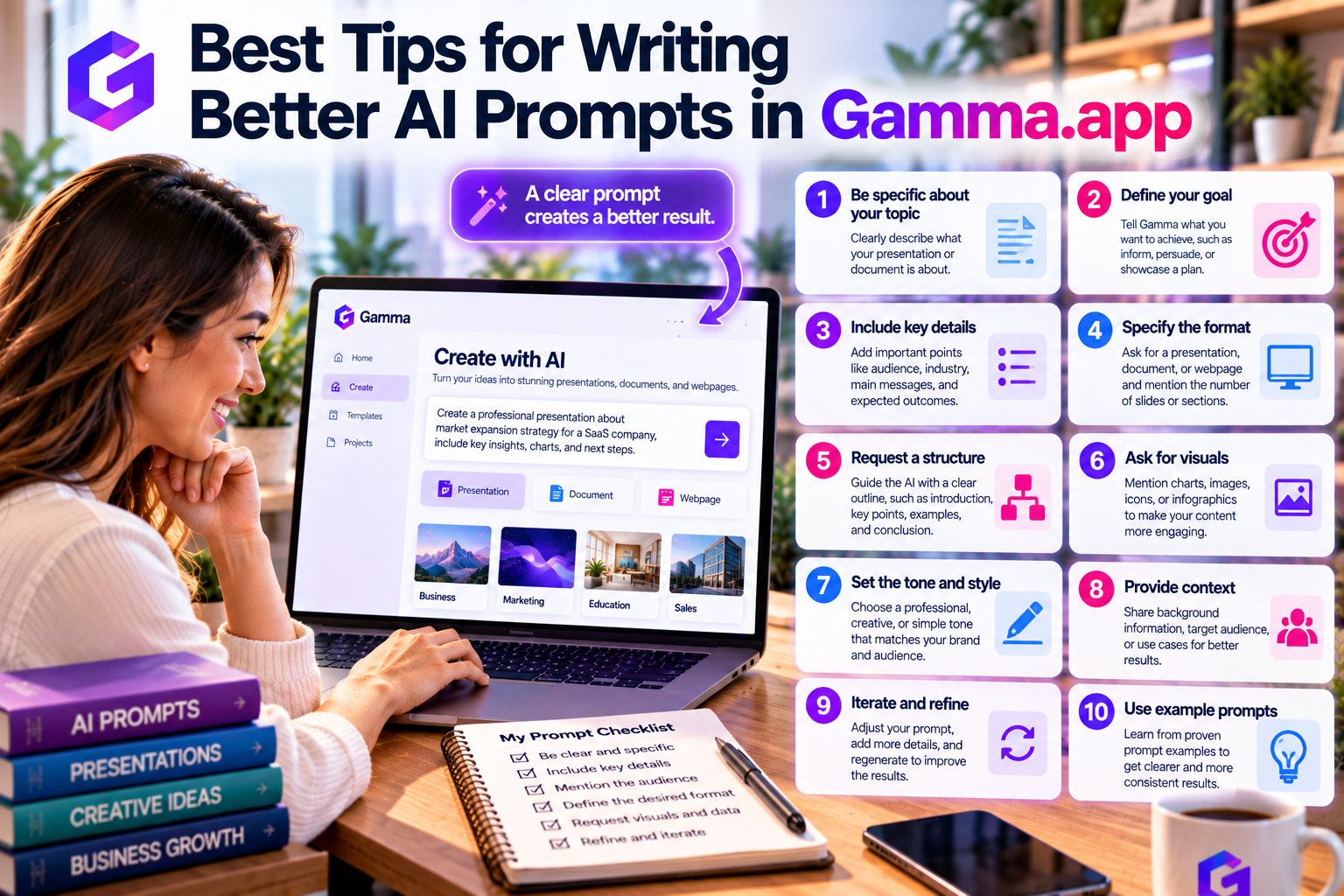
Why Prompt Quality Matters
Think of Gamma AI as a highly skilled assistant.
If you simply say:
Create a marketing presentation.
The AI has very little information to work with.
However, if you provide detailed instructions such as:
Create a 12-slide marketing presentation for a SaaS project management platform targeting small businesses. Include customer pain points, product features, pricing, competitive advantages, customer success stories, and a strong call to action. Use a modern and professional design.
The result will be significantly more accurate and useful.
The more context you provide, the better Gamma can understand your objectives.
Include Your Goal
Start every prompt by explaining what you're trying to accomplish.
Examples include:
- Sales presentation
- Investor pitch deck
- Marketing strategy
- SEO report
- Product launch
- Business proposal
- Employee training
- Educational lesson
Clearly defining the objective helps Gamma organize the content appropriately.
Identify Your Target Audience
Every presentation should be tailored to its audience.
Specify exactly who will read or watch the content.
Examples include:
- Startup investors
- Marketing managers
- Small business owners
- Enterprise executives
- Students
- Teachers
- Sales teams
- Software developers
- Healthcare professionals
A presentation designed for executives should look very different from one intended for university students.
Audience context allows Gamma to choose the appropriate language, examples, and level of detail.
Describe the Desired Structure
Rather than asking Gamma to generate “a presentation,” tell it what sections to include.
For example:
Include:
- Introduction
- Current challenges
- Proposed solution
- Key features
- Pricing
- Customer case studies
- ROI
- Conclusion
Providing a clear structure ensures important topics are not overlooked.
Specify the Tone
Different situations require different communication styles.
Examples include:
- Professional
- Conversational
- Formal
- Educational
- Persuasive
- Executive
- Friendly
- Technical
For instance, an investor presentation should sound confident and data-driven, while an educational presentation should be simple and easy to understand.
Gamma adapts its writing style based on your instructions.
Define the Length
You should also specify how much content you need.
Examples include:
- 10 slides
- 15 slides
- 500-word report
- One-page proposal
- Short executive summary
- Detailed business plan
Without length guidance, AI may generate content that is either too brief or unnecessarily detailed.
Mention Industry Context
Business terminology differs across industries.
Whenever possible, include your industry.
Examples include:
- SaaS
- Healthcare
- Finance
- Manufacturing
- Education
- Real Estate
- eCommerce
- Marketing
- Human Resources
Industry context helps Gamma generate more relevant examples and recommendations.
Ask for Visual Elements
Gamma supports visual content in addition to text.
You can request:
- Charts
- Tables
- Timelines
- Icons
- Infographics
- Comparison matrices
- Process diagrams
- Callout boxes
For example:
Include a comparison table showing our product versus competitors.
These instructions create more engaging presentations.
Use Chat-Based Editing
Your first prompt doesn't have to be perfect.
Gamma allows you to improve content through conversational editing.
After generating your presentation, you can simply ask:
- “Rewrite this slide.”
- “Make the tone more persuasive.”
- “Add industry statistics.”
- “Shorten this section.”
- “Include another customer example.”
- “Create a stronger conclusion.”
This iterative workflow helps refine presentations quickly without rebuilding them from scratch.
Examples of Strong Gamma Prompts
Sales Presentation
Create a 12-slide sales presentation for an AI-powered CRM platform targeting small businesses. Include customer pain points, key features, pricing plans, customer success stories, implementation process, and a strong call to action. Use a professional and modern design.
Marketing Report
Create a monthly digital marketing report summarizing website traffic, SEO performance, paid advertising results, social media engagement, ROI, key insights, and recommendations. Use charts and executive-friendly formatting.
Educational Lesson
Create a classroom presentation explaining climate change for high school students. Include definitions, causes, effects, real-world examples, discussion questions, and a summary.
Investor Pitch Deck
Create a startup pitch deck for a cybersecurity SaaS company seeking Seed funding. Include problem, solution, market opportunity, business model, traction, competition, financial projections, team, and investment request.
These prompts provide Gamma with enough context to generate high-quality results immediately.
Common Prompt Mistakes
Avoid these common errors:
- Writing prompts that are too vague.
- Forgetting to specify the audience.
- Omitting the desired tone.
- Not describing the presentation structure.
- Expecting AI to know company-specific information.
- Publishing AI-generated content without reviewing it.
Remember that AI creates drafts—it does not replace your expertise or business knowledge.
Best Practices for Better Results
To consistently generate excellent content:
- Be specific rather than general.
- Clearly state your objective.
- Include audience information.
- Define the presentation structure.
- Specify tone and writing style.
- Mention industry context.
- Request visual elements when appropriate.
- Refine the output using Chat-Based Editing.
Following these practices will significantly improve the quality of Gamma's AI-generated presentations and documents.
Final Thoughts
Writing better prompts is one of the easiest ways to unlock the full potential of Gamma.app. Instead of treating AI as a simple content generator, think of it as a creative collaborator that performs best when given clear direction.
By providing detailed objectives, audience information, tone, structure, and formatting preferences, you can generate presentations, business documents, reports, and webpages that require minimal editing while maintaining a professional standard.
As AI becomes an essential part of workplace productivity, prompt writing is rapidly becoming a valuable professional skill. Mastering prompt engineering in Gamma.app not only saves time but also helps you create higher-quality content with greater consistency and confidence.







Write Your Review
No reviews yet. Be the first to share your experience!