
Building a high-converting landing page is only the first step in a successful marketing campaign. Once visitors submit a form, businesses need an efficient way to store, organize, and follow up with those leads. Manually exporting and importing data wastes time and increases the risk of missed opportunities.
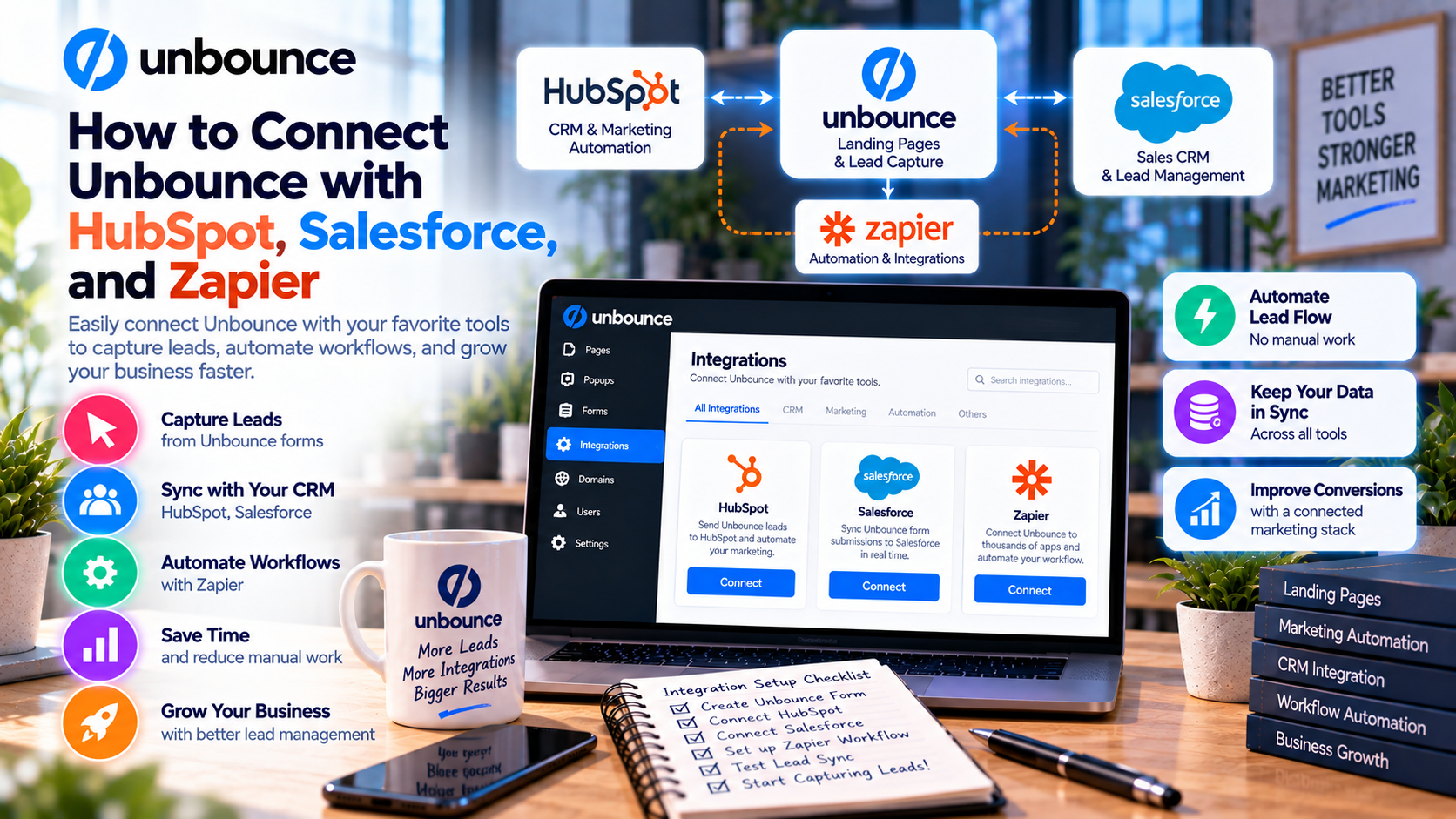
Unbounce solves this challenge through integrations with popular CRM and marketing automation platforms such as HubSpot, Salesforce, and Zapier. These integrations automatically transfer lead information, trigger workflows, and streamline communication between marketing and sales teams.
In this guide, you'll learn how to connect Unbounce with these platforms and automate your lead management process.
Why Integrate Unbounce with Your CRM?
A landing page generates leads, but a CRM helps turn those leads into customers.
Without integration, marketers often need to:
- Download CSV files
- Import contacts manually
- Update customer records
- Notify sales teams
- Trigger email campaigns
This manual process is slow and prone to errors.
By connecting Unbounce with your CRM or automation platform, every new lead is captured instantly and sent to the right destination without additional work.
Benefits of Unbounce Integrations
Connecting Unbounce with marketing tools provides several advantages.
Key benefits include:
- Automatic lead synchronization
- Faster sales follow-up
- Improved customer experience
- Reduced manual data entry
- Better campaign reporting
- Marketing automation
- More accurate customer records
These efficiencies allow teams to focus on nurturing leads instead of managing spreadsheets.
Connecting Unbounce with HubSpot
HubSpot is one of the most popular CRM and marketing automation platforms for businesses of all sizes.
Step 1: Access the Integrations Menu
Log in to your Unbounce account and open the landing page that contains your lead form.
Navigate to the Integrations section.
Step 2: Connect Your HubSpot Account
Select HubSpot from the list of available integrations.
Authorize Unbounce to access your HubSpot account by signing in and granting the required permissions.
Step 3: Map Form Fields
Choose how information collected on your landing page should appear in HubSpot.
Typical fields include:
- First Name
- Last Name
- Email Address
- Company Name
- Phone Number
- Job Title
Correct field mapping ensures accurate customer records.
Step 4: Test the Integration
Submit a test form from your landing page.
Confirm that the contact appears correctly in HubSpot before launching your campaign.
Connecting Unbounce with Salesforce
Salesforce is widely used by enterprise sales organizations to manage customer relationships and sales pipelines.
Connecting Unbounce with Salesforce enables sales representatives to receive new leads immediately after a form submission.
Setup Process
- Open the Unbounce Integrations page.
- Select Salesforce.
- Sign in to your Salesforce account.
- Authorize the connection.
- Map landing page form fields to Salesforce objects.
- Save the integration.
- Submit a test lead.
Once connected, new prospects automatically enter your CRM, reducing delays in lead follow-up.
Connecting Unbounce with Zapier
Zapier expands Unbounce's capabilities by connecting it with thousands of applications—even if no direct integration exists.
Examples include:
- Slack
- Trello
- Asana
- Notion
- Airtable
- Google Sheets
- Microsoft Teams
- Gmail
- ActiveCampaign
How to Create a Zap
- Log in to Zapier.
- Create a new Zap.
- Select Unbounce as the trigger.
- Choose New Form Submission.
- Connect your Unbounce account.
- Select an action app.
- Map your fields.
- Test the automation.
- Publish the Zap.
Now every form submission can automatically trigger additional workflows.
Popular Automation Workflows
Businesses commonly use Unbounce integrations to automate repetitive tasks.
Examples include:
Lead Notifications
Send instant Slack or Microsoft Teams alerts whenever a new lead arrives.
Email Marketing
Automatically add subscribers to:
- Mailchimp
- ActiveCampaign
- Constant Contact
This allows welcome emails and nurturing campaigns to begin immediately.
CRM Updates
Create or update customer records automatically in:
- HubSpot
- Salesforce
- Zoho CRM
- Pipedrive
Sales teams receive qualified leads without manual data entry.
Task Management
Generate follow-up tasks in:
- Trello
- Asana
- Monday.com
- ClickUp
This keeps marketing and sales teams aligned.
Best Practices for Successful Integrations
To maximize the value of your integrations:
Standardize Form Fields
Use consistent naming conventions across your landing pages and CRM.
Test Every Workflow
Always submit multiple test leads before launching a campaign to ensure all automations function correctly.
Avoid Duplicate Records
Configure your CRM to identify existing contacts and update records instead of creating duplicates whenever possible.
Automate Lead Routing
Use CRM workflows to assign leads automatically based on:
- Industry
- Location
- Company size
- Product interest
This helps sales representatives respond more efficiently.
Monitor Integration Performance
Review automation logs regularly to ensure leads continue flowing correctly between systems.
Common Integration Mistakes
Many businesses encounter problems because of simple configuration errors.
Avoid these common mistakes:
- Incorrect field mapping
- Missing required CRM fields
- Forgetting to test workflows
- Using outdated API credentials
- Creating duplicate contacts
- Ignoring error notifications
- Not reviewing automation rules
Regular maintenance helps prevent data issues.
Real-World Use Cases
Businesses use Unbounce integrations in many ways.
SaaS Companies
Automatically create demo requests in HubSpot and trigger onboarding email sequences.
Marketing Agencies
Deliver client leads directly into separate CRM pipelines while sending Slack notifications to account managers.
Ecommerce Brands
Add customers to email marketing platforms for abandoned cart campaigns and promotional offers.
B2B Sales Teams
Route enterprise leads to regional sales representatives based on company size or geographic location.
Event Organizers
Automatically register webinar attendees, send confirmation emails, and update CRM records after every sign-up.
Why Businesses Integrate Unbounce
Organizations choose Unbounce because it works seamlessly with the software they already use.
Key advantages include:
- Faster lead processing
- Reduced manual work
- Better collaboration
- Improved customer experience
- Automated marketing workflows
- Real-time reporting
- Scalable business operations
These benefits help organizations increase productivity while improving conversion outcomes.
Final Verdict
Unbounce becomes even more powerful when integrated with platforms like HubSpot, Salesforce, and Zapier. Instead of manually managing lead data, businesses can automate the entire process—from form submission to CRM updates, email marketing, task creation, and sales notifications.
Whether you're a SaaS company, marketing agency, ecommerce business, or growing startup, these integrations help eliminate repetitive work, improve response times, and ensure every lead receives timely follow-up. By combining Unbounce's landing page capabilities with automation tools, businesses can build a more efficient, scalable, and results-driven marketing ecosystem.
Write Your Review
No reviews yet. Be the first to share your experience!