
Running a successful Google Ads campaign involves more than choosing the right keywords and setting an advertising budget. To achieve high conversion rates and maximize return on investment (ROI), your landing page must closely match the user's search intent.
One feature that helps bridge the gap between search ads and landing pages is Dynamic Text Replacement (DTR). Available in Unbounce, this tool automatically adjusts selected text on a landing page to reflect the keywords a visitor used in their Google search. By delivering more relevant messaging, Dynamic Text Replacement can improve user experience, increase conversions, and support stronger advertising performance.
In this guide, we'll explain how Dynamic Text Replacement works, its benefits, and best practices for using it effectively.
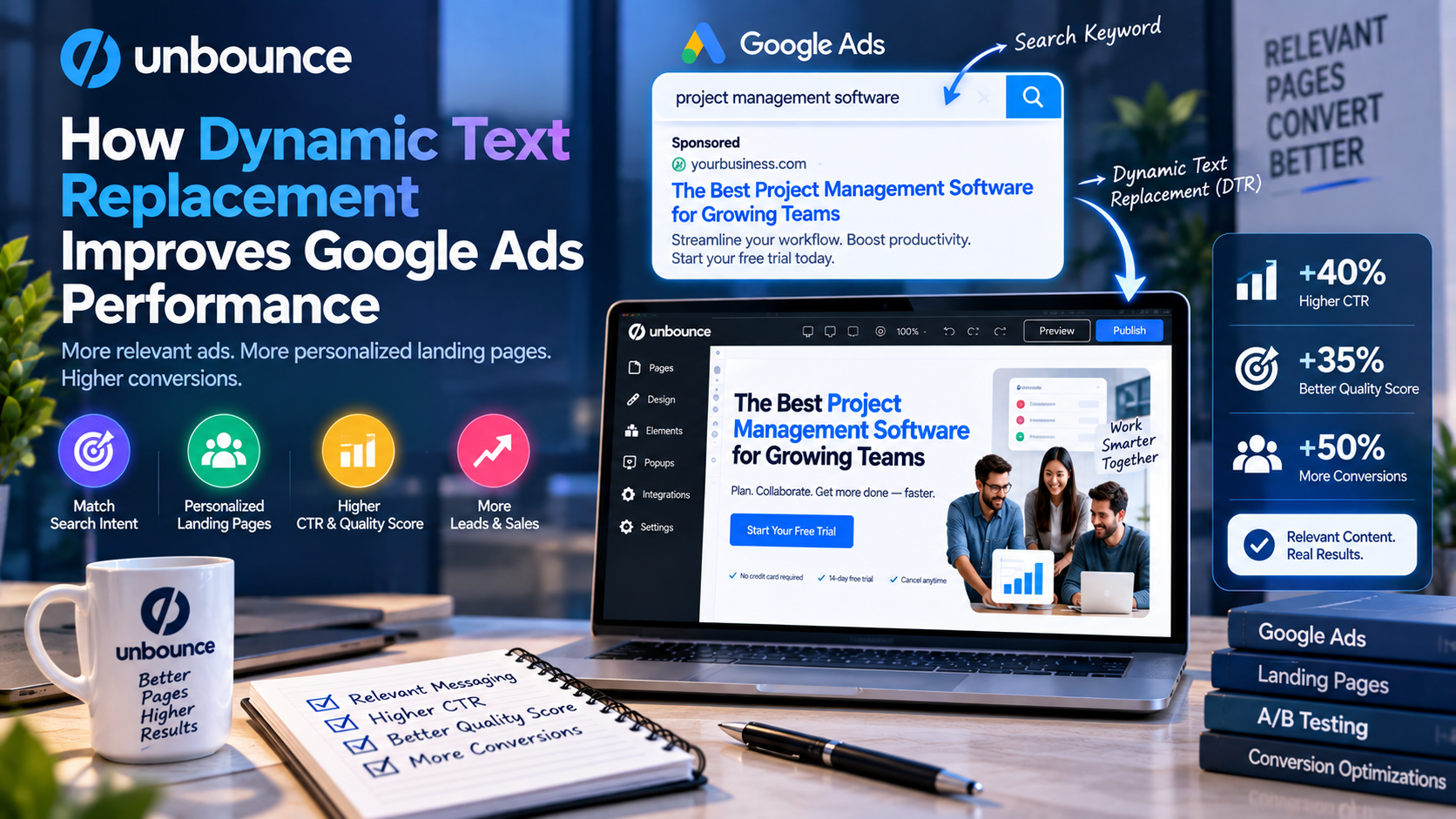
What Is Dynamic Text Replacement?
Dynamic Text Replacement is a personalization feature that changes specific words or phrases on a landing page based on the keyword or parameter passed from an advertising campaign.
Instead of creating separate landing pages for every keyword, marketers can build one page that dynamically updates elements such as:
- Headlines
- Subheadings
- Product names
- Call-to-action (CTA) text
- Promotional messages
This allows each visitor to see messaging that closely matches what they searched for.
Why Relevance Matters in Google Ads
Google Ads is designed to show users the most relevant ads and landing pages for their search queries.
When a visitor clicks an ad that promises one thing but lands on a page with different messaging, they are more likely to leave without converting.
Relevant landing pages can help:
- Improve user experience
- Reduce bounce rates
- Increase engagement
- Generate more qualified leads
- Improve advertising efficiency
Matching your landing page content to search intent creates a smoother journey from ad click to conversion.
How Dynamic Text Replacement Works
Using Dynamic Text Replacement in Unbounce is straightforward.
Step 1: Create Your Landing Page
Build a landing page that contains placeholder text for the content you want to personalize.
For example:
Headline:
“The Best CRM Software for Your Business”
Step 2: Define Dynamic Fields
Choose which words or phrases should change dynamically.
The platform can replace selected text with values passed from your Google Ads campaign while keeping a default version for visitors without matching parameters.
Step 3: Connect Your Google Ads Campaign
When creating your Google Ads campaign, include keyword parameters that Unbounce can read.
As visitors click your ads, those parameters are automatically inserted into the designated areas of the landing page.
Step 4: Deliver Personalized Experiences
A visitor searching for:
- CRM software for startups
may see:
“The Best CRM Software for Startups.”
Another visitor searching for:
- CRM software for real estate
could automatically see:
“The Best CRM Software for Real Estate.”
The page design remains the same, but the messaging becomes more relevant to each audience.
Benefits of Dynamic Text Replacement
Better Message Matching
Visitors feel more confident when the landing page reflects exactly what they searched for.
This consistency builds trust and encourages users to continue exploring your offer.
Higher Conversion Rates
Relevant messaging helps visitors immediately understand that they have arrived at the right place.
This reduces confusion and increases the likelihood of completing actions such as:
- Filling out a form
- Starting a free trial
- Booking a demo
- Making a purchase
Improved User Experience
Personalized landing pages create a smoother customer journey.
Instead of generic marketing messages, visitors receive content that aligns with their interests and search intent.
Better Campaign Management
Without Dynamic Text Replacement, marketers often create dozens of nearly identical landing pages for different keywords.
DTR allows multiple campaigns to use a single landing page while still displaying keyword-specific messaging.
This saves both time and maintenance effort.
Dynamic Text Replacement vs. Multiple Landing Pages
Many marketers wonder whether they should build separate landing pages or use Dynamic Text Replacement.
Separate Landing Pages
Pros
- Complete customization
- Highly specific messaging
- Useful for very different audiences
Cons
- Time-consuming to create
- Difficult to maintain
- More pages to update
Dynamic Text Replacement
Pros
- Faster implementation
- Easier maintenance
- Personalized messaging
- Scalable for large campaigns
Cons
- Limited to selected text elements
- Requires careful keyword planning
For many PPC campaigns, Dynamic Text Replacement offers an efficient balance between personalization and simplicity.
Best Practices
To maximize the benefits of Dynamic Text Replacement, follow these recommendations.
Use Relevant Keywords
Only replace text with keywords that naturally fit your landing page content.
Poor keyword choices can make headlines sound awkward or confusing.
Keep Default Text Clear
Always include meaningful default text in case no keyword parameter is available.
This ensures every visitor receives a professional experience.
Focus on High-Impact Areas
Dynamic headlines, subheadings, and CTA messages often have the greatest influence on conversions.
There's no need to replace every piece of content on the page.
Combine with A/B Testing
Test different headline styles and CTA wording to determine which personalized messaging performs best.
Data-driven optimization can further improve campaign results.
Use Alongside Smart Traffic
Dynamic Text Replacement becomes even more effective when paired with Unbounce Smart Traffic.
While DTR personalizes the message, Smart Traffic uses AI to direct visitors to the landing page variation most likely to convert.
Together, they create a highly optimized visitor experience.
Real-World Use Cases
SaaS Companies
Promote software solutions for different industries using one landing page with dynamic headlines.
Ecommerce Businesses
Display product categories or promotional offers based on search terms.
Marketing Agencies
Manage multiple client campaigns while reducing the need for separate landing pages.
B2B Companies
Personalize messaging for different business sectors, job roles, or service categories without duplicating page designs.
Common Mistakes to Avoid
Although Dynamic Text Replacement is easy to use, marketers should avoid several common mistakes:
- Replacing too much content
- Using keywords that don't fit naturally
- Ignoring mobile optimization
- Forgetting default text
- Not testing personalized headlines
- Failing to monitor campaign performance
Following best practices ensures a more consistent and effective user experience.
Who Should Use Dynamic Text Replacement?
This feature is particularly valuable for:
- Google Ads advertisers
- PPC specialists
- SaaS companies
- Ecommerce brands
- Digital marketing agencies
- Lead generation businesses
- B2B marketing teams
Any organization managing multiple keyword-based advertising campaigns can benefit from more personalized landing page experiences.
Final Verdict
Dynamic Text Replacement is one of Unbounce's most valuable features for paid advertising. By automatically matching landing page messaging to a visitor's search query, it helps create a more relevant and personalized experience from the moment someone clicks an ad.
When combined with Unbounce's drag-and-drop builder, A/B testing, Smart Traffic, and lead capture tools, Dynamic Text Replacement becomes a powerful asset for improving campaign performance. Businesses can streamline landing page management, deliver more targeted messaging, and increase the likelihood of converting visitors into customers.
For marketers looking to maximize the effectiveness of their Google Ads campaigns, Dynamic Text Replacement is a practical and efficient way to improve relevance, user experience, and overall conversion performance.




Write Your Review
No reviews yet. Be the first to share your experience!