
Business reports are essential for communicating performance, tracking progress, and supporting strategic decision-making. Every department—from marketing and sales to finance and operations—relies on reports to present data, identify trends, and recommend actions.
Unfortunately, traditional business reports are often long, text-heavy, and difficult to read. Preparing them also requires significant time for writing, formatting, and designing charts. As organizations generate more data than ever before, professionals need a faster and more engaging way to present information.
Gamma.app offers a modern solution by combining artificial intelligence, interactive design, and collaborative editing into one platform. Instead of creating static documents, businesses can build visually appealing reports that are easy to navigate, share, and update.
In this guide, you'll learn how to create interactive business reports with Gamma.app and why it's becoming a preferred reporting tool for modern organizations.

Why Traditional Reports Fall Short
Conventional reports created in word processors or presentation software often have several limitations:
- Long blocks of text reduce readability.
- Manual formatting consumes valuable time.
- Charts and visuals require separate tools.
- Sharing updated versions creates confusion.
- Static documents quickly become outdated.
Decision-makers typically want concise insights, clear visualizations, and actionable recommendations—not dozens of pages filled with dense text.
Gamma addresses these challenges with AI-generated content and an interactive, web-based format.
Step 1: Define Your Report Objective
Before generating a report, determine its purpose.
Common business reports include:
- Monthly business reviews
- Sales performance reports
- Marketing campaign summaries
- Financial overviews
- SEO performance reports
- Customer success reports
- Project status updates
- Executive dashboards
Knowing your audience and objective helps Gamma generate more relevant content.
For example:
Create a monthly marketing performance report for an eCommerce company. Include campaign results, website traffic, conversion rates, advertising ROI, key insights, and recommendations.
A detailed prompt produces a stronger first draft.
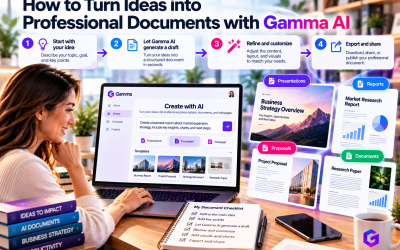
Step 2: Let AI Build the Report Structure
Gamma automatically creates a logical outline based on your prompt.
A typical business report may include:
- Executive Summary
- Objectives
- Key Performance Indicators (KPIs)
- Performance Highlights
- Data Analysis
- Challenges
- Opportunities
- Recommendations
- Next Steps
This structured approach helps readers quickly understand the report without searching through lengthy sections.
Step 3: Add Interactive Visual Elements
One of Gamma's biggest advantages is its ability to present information visually.
Instead of relying on text alone, you can include:
- Charts
- Tables
- Timelines
- Process diagrams
- Images
- Videos
- Embedded content
- Comparison cards
These elements make reports easier to understand while keeping readers engaged.
For example, instead of describing quarterly revenue growth in several paragraphs, a simple chart communicates the same information instantly.
Step 4: Use AI to Improve Report Writing
Business reports should be clear, concise, and professional.
Gamma's AI writing assistant helps users:
- Rewrite complex paragraphs
- Summarize lengthy sections
- Improve grammar
- Adjust writing tone
- Expand recommendations
- Generate executive summaries
Simply enter commands such as:
- “Make this section more concise.”
- “Explain these results for executives.”
- “Add three actionable recommendations.”
- “Rewrite this in a professional tone.”
The AI updates the report while maintaining its layout and formatting.
Step 5: Collaborate with Your Team
Reports often require contributions from multiple departments.
Gamma allows teams to work together in real time.
Marketing can update campaign metrics.
Sales can contribute revenue figures.
Finance can review forecasts.
Leadership can provide strategic recommendations.
Instead of emailing different document versions, everyone collaborates within the same workspace.
This improves efficiency and reduces version-control issues.
Step 6: Customize for Different Audiences
Not every stakeholder needs the same level of detail.
Gamma makes it easy to tailor reports for different audiences.
For example:
Executives
Focus on KPIs, strategic insights, and recommendations.
Department Managers
Include operational details and performance analysis.
Clients
Highlight campaign outcomes, ROI, and future opportunities.
Investors
Emphasize financial performance, growth metrics, and business strategy.
Using AI editing, these adjustments take only a few minutes.
Step 7: Share Reports Instantly
Once the report is complete, Gamma offers multiple sharing options.
You can:
- Share a live web link
- Present directly from your browser
- Export to PDF
- Export to PowerPoint
- Update reports without creating new files
This flexibility makes Gamma ideal for remote teams, client meetings, and executive presentations.
Business Reports You Can Create
Gamma supports a wide range of professional reporting needs, including:
- Sales Reports
- Marketing Performance Reports
- SEO Reports
- Financial Reports
- Business Review Documents
- Product Performance Reports
- Customer Success Reports
- HR Reports
- Project Status Reports
- Annual Business Reviews
Its flexibility makes it suitable for organizations of all sizes.
Best Practices for Interactive Reports
To create reports that deliver maximum value:
- Start with a clear business objective.
- Focus on key metrics rather than overwhelming readers with data.
- Use visuals to simplify complex information.
- Keep each section concise and actionable.
- End with practical recommendations and next steps.
- Review AI-generated insights for accuracy before sharing.
These practices improve both readability and decision-making.
Why Businesses Choose Gamma
Compared with traditional reporting tools, Gamma offers several advantages:
- AI-generated report writing
- Professional layouts without manual formatting
- Interactive content cards
- Real-time collaboration
- Easy customization
- Browser-based sharing
- Faster report creation
These benefits allow teams to spend more time analyzing business performance and less time creating documents.
Final Thoughts
Gamma.app is redefining business reporting by combining artificial intelligence, modern design, and cloud collaboration into a single platform. Instead of producing static documents filled with dense text, businesses can create interactive reports that are visually engaging, easy to understand, and simple to update.
Whether you're presenting monthly KPIs, marketing campaign results, financial performance, or strategic recommendations, Gamma helps transform complex information into compelling business stories.
For organizations looking to modernize their reporting process, improve collaboration, and save valuable time, Gamma.app is one of the best AI-powered business reporting solutions available today. It empowers professionals to create reports that not only inform but also inspire better business decisions.









Write Your Review
No reviews yet. Be the first to share your experience!