
Customer service teams spend a significant portion of their day handling repetitive tasks. Answering the same questions, routing conversations, collecting customer information, and following up on inquiries may seem simple, but together they consume valuable time and reduce productivity.
As businesses grow, these repetitive tasks become increasingly difficult to manage manually. Hiring more support agents isn't always the most cost-effective solution.
This is where Tidio Workflow Automation comes in.
With its intuitive no-code automation builder, Tidio allows businesses to automate routine customer interactions, freeing support teams to focus on high-value conversations that require human expertise. The result is faster response times, improved customer satisfaction, and lower operating costs.
In this guide, we'll explore how Tidio Workflow Automation works, its key features, and how businesses can use it to streamline customer service in 2026.
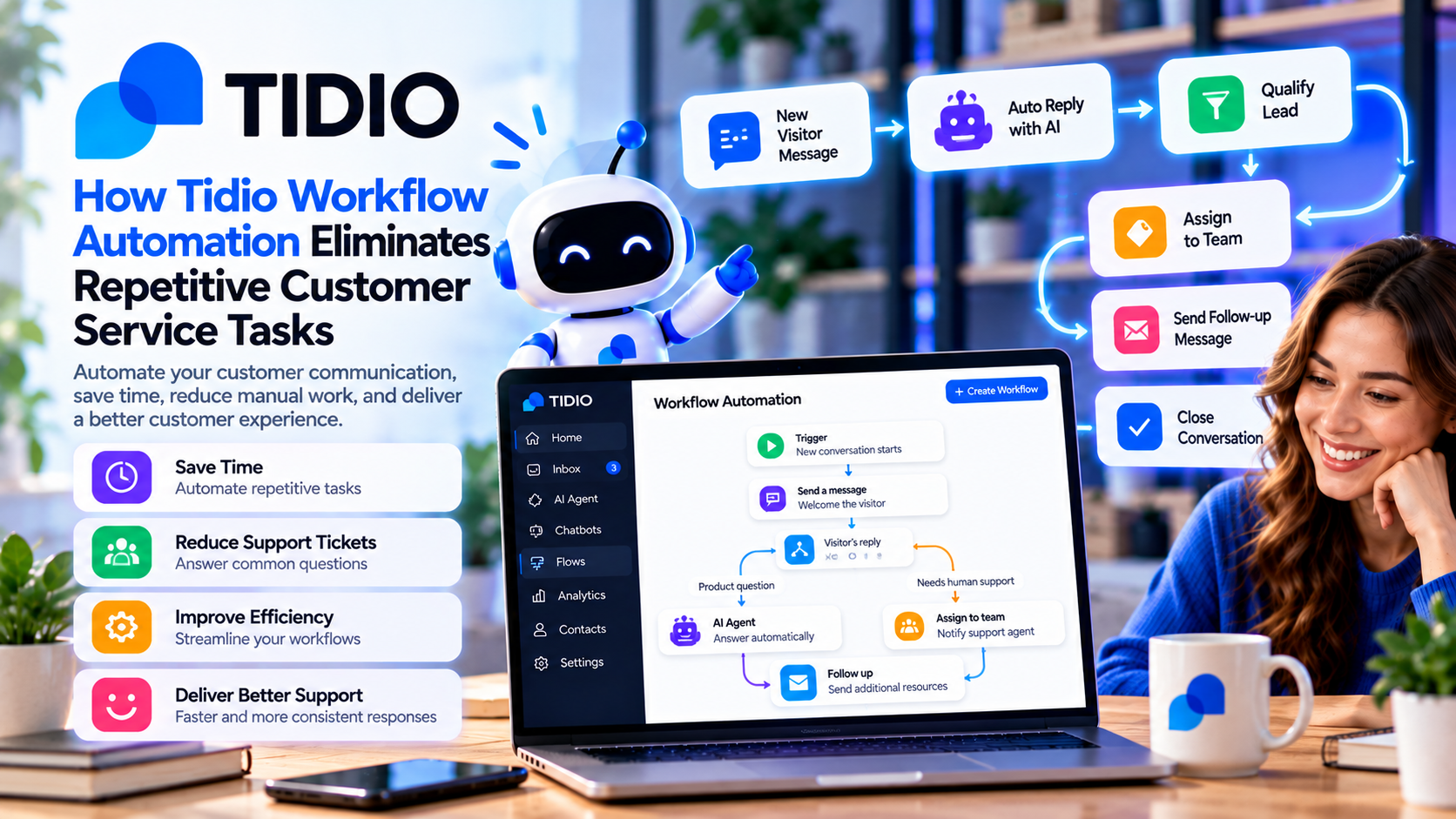
What Is Tidio Workflow Automation?
Tidio Workflow Automation is a visual drag-and-drop tool that enables businesses to create automated customer service workflows without writing code.
Instead of manually responding to every inquiry, businesses can build intelligent workflows that automatically:
- Welcome visitors
- Answer common questions
- Route conversations
- Collect customer information
- Qualify leads
- Schedule appointments
- Escalate complex issues to live agents
The automation builder makes it easy for both technical and non-technical teams to create efficient customer journeys.
Why Automation Matters
Customer expectations continue to rise.
People want:
- Instant responses
- 24/7 availability
- Personalized service
- Consistent communication
- Quick issue resolution
Meeting these expectations manually becomes increasingly difficult as customer inquiries grow.
Automation helps businesses deliver faster service without continuously expanding their support teams.
Automating Frequently Asked Questions
One of the simplest and most effective uses of workflow automation is handling frequently asked questions.
Common automated responses include:
- Business hours
- Shipping information
- Return policies
- Payment methods
- Product availability
- Contact information
Instead of waiting for a support agent, customers receive answers within seconds.
This dramatically reduces ticket volume while improving customer satisfaction.
Greeting Visitors Automatically
First impressions matter.
Tidio allows businesses to automatically welcome visitors based on various conditions.
For example:
- First-time visitors
- Returning customers
- Visitors viewing pricing pages
- Customers browsing product pages
- High-value prospects
A friendly greeting such as:
“Hi! Welcome to our store. Let us know if you need help finding the perfect product.”
can encourage engagement and increase conversion opportunities.
Automatically Routing Conversations
Not every inquiry belongs to the same department.
Tidio workflows can automatically direct conversations to the appropriate team based on customer responses.
Examples include:
- Sales inquiries
- Technical support
- Billing questions
- Returns and refunds
- Product consultations
Smart routing reduces wait times while ensuring customers reach the right expert immediately.
Capturing Leads While You Sleep
Customer inquiries don't stop after business hours.
Instead of losing potential leads overnight, Tidio workflows can automatically collect information such as:
- Name
- Email address
- Phone number
- Company name
- Product interest
The system stores this information so your sales or support team can follow up as soon as they return.
This ensures that no valuable opportunity is missed.
Recovering Abandoned Shopping Carts
For ecommerce businesses, abandoned carts represent lost revenue.
Tidio automation helps recover potential sales by triggering personalized chat messages when shoppers hesitate during checkout.
Examples include:
- Offering assistance
- Answering last-minute questions
- Suggesting related products
- Providing discount codes
- Encouraging checkout completion
These automated interactions can help improve conversion rates without requiring manual intervention.
Scheduling Appointments Automatically
Businesses that offer consultations or services can automate appointment booking through Tidio workflows.
Customers can:
- Request meetings
- Select available times
- Receive confirmation messages
- Get appointment reminders
Automated scheduling reduces administrative work while improving the customer experience.
Combining AI with Workflow Automation
One of Tidio's greatest strengths is the integration between Workflow Automation and Lyro AI Agent.
Together they can:
- Answer customer questions automatically
- Guide visitors through workflows
- Escalate complex conversations
- Collect customer information
- Continue learning from your knowledge base
This combination allows businesses to automate a large percentage of customer interactions while maintaining high-quality support.
Benefits of Workflow Automation
Implementing automation offers several advantages:
Faster Response Times
Customers receive immediate assistance without waiting for an available agent.
Lower Support Costs
Automating repetitive tasks reduces the need for additional support staff.
Improved Agent Productivity
Support teams spend less time answering routine questions and more time solving complex problems.
Consistent Customer Experience
Every customer receives accurate and standardized responses regardless of the time of day.
Better Scalability
As your business grows, automation handles increasing conversation volumes without significantly increasing operational costs.
Best Practices for Building Effective Workflows
To maximize results:
Keep Workflows Simple
Start with basic automations before creating more advanced customer journeys.
Focus on High-Volume Questions
Automate the conversations your support team answers most frequently.
Regularly Update Workflows
Review customer conversations to identify opportunities for improvement.
Always Provide a Human Option
Customers should always have the ability to speak with a live support agent if needed.
Test Before Publishing
Review every automation to ensure customers receive the correct responses and routing.
Who Should Use Tidio Workflow Automation?
Workflow Automation is ideal for:
- Ecommerce businesses
- SaaS companies
- Customer support teams
- Marketing agencies
- Online service providers
- Small businesses
- Growing startups
Any organization that receives repetitive customer inquiries can benefit from automation.



Write Your Review
No reviews yet. Be the first to share your experience!